
Subaru Ascent 2018-2026 Owner's Manual: Inside mirror
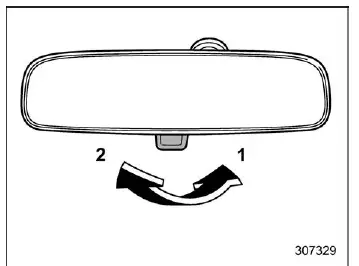
- Normal position
- Anti-glare position
In the Subaru Ascent, the interior rearview mirror is designed to provide clear visibility under various lighting conditions. For standard daytime driving, push the tab to keep the mirror in its normal reflective position, ensuring a bright and accurate rear view.
When driving at night, especially with vehicles following behind, pull the tab to switch the mirror into the anti-glare position. This reduces the intensity of headlights from trailing vehicles, helping the driver of the Subaru Ascent maintain focus and avoid eye strain during extended nighttime travel.
Auto-dimming mirror/compass with HomeLink
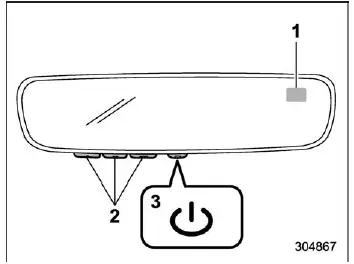
- Compass
- HomeLink Buttons
- Switch
The advanced auto-dimming mirror system in the Subaru Ascent enhances driving comfort by automatically adjusting mirror brightness. During nighttime operation, it detects glare from vehicles behind and gradually darkens the reflective surface, allowing the driver to maintain optimal rear visibility without distraction.
To Operate the Auto-Dimming Feature
Press the "
 "
switch to activate or deactivate the auto-dimming function. When the green LED indicator
is illuminated, the feature is active. In the Subaru Ascent, this setting is automatically
restored with each ignition cycle, ensuring consistent usability.
"
switch to activate or deactivate the auto-dimming function. When the green LED indicator
is illuminated, the feature is active. In the Subaru Ascent, this setting is automatically
restored with each ignition cycle, ensuring consistent usability.
To Operate the Compass Feature
1. To enable or disable the compass display, press and hold the "
 "
switch for more than 3 seconds until the display responds. The compass in the Subaru
Ascent is designed to automatically remain active after each engine restart.
"
switch for more than 3 seconds until the display responds. The compass in the Subaru
Ascent is designed to automatically remain active after each engine restart.
2. If the display shows "C", slowly drive the Subaru Ascent in a circular path. This motion allows the system to recalibrate and accurately determine directional orientation.
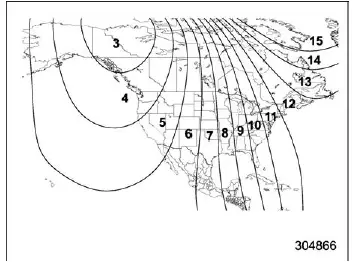
Compass calibration zones
3. To correctly adjust the compass according to your geographic location:
- Identify your current region and corresponding zone number on the calibration map.
- Press and hold the "
 "
switch for more than 6 seconds until a zone number appears.
"
switch for more than 6 seconds until a zone number appears. - Once displayed, press the "
 "
switch repeatedly until the correct zone number for your location is shown.
After a few seconds of inactivity, the setting will be stored automatically,
and the compass will resume normal operation.
"
switch repeatedly until the correct zone number for your location is shown.
After a few seconds of inactivity, the setting will be stored automatically,
and the compass will resume normal operation.
4. If magnetic interference affects the system or the compass becomes inaccurate,
recalibration is required. Press and hold the "
 "
switch for more than 9 seconds until the display shows "C". Then drive the Subaru
Ascent slowly in circles until the calibration process is complete.
"
switch for more than 9 seconds until the display shows "C". Then drive the Subaru
Ascent slowly in circles until the calibration process is complete.
HomeLink Wireless Control System
The HomeLink system integrated into the Subaru Ascent allows seamless control of up to three remote-operated devices directly from the vehicle. This includes garage doors, gates, home security systems, entry locks, and even lighting systems, eliminating the need for multiple handheld remotes.
The programming process may vary slightly depending on the device manufacturer, but generally follows a standard procedure. For specific devices such as Genie or Sommer garage door openers, it is recommended to consult the official HomeLink resources for precise instructions.
Additional guidance, including step-by-step tutorials and instructional videos, is available online at www.HomeLink.com and www.youtube.com/HomeLinkGentex, helping Subaru Ascent owners fully utilize this convenient feature.
CAUTION
- Before initiating HomeLink programming, ensure that no people, pets, or objects are in the path of the device being controlled, such as a garage door or gate, to avoid injury or damage.
- It is strongly recommended to perform garage door programming while the Subaru Ascent is parked outside the garage to maintain a safe working distance.
- Do not attempt to use HomeLink with outdated garage door systems that lack automatic stop and reverse safety features. Systems manufactured before April 1, 1982 may not comply with current safety standards.
- For more reliable and faster programming, install a fresh battery in the handheld remote control before beginning the setup process.
- Depending on the Subaru Ascent configuration, the ignition switch may need to be in the "ON" or "ACC" position during programming or operation.
- Keep the original handheld remote accessible for future programming or for use in other vehicles if needed.
The interior mirror system in the Subaru Ascent combines traditional functionality with advanced electronic features, providing both convenience and safety. Proper adjustment, periodic calibration, and correct use of HomeLink ensure a more comfortable and controlled driving experience in various conditions.
For enhanced security in the Subaru Ascent, it is strongly recommended that all programmed HomeLink buttons be cleared when ownership of the vehicle changes. This helps prevent unauthorized access to connected systems such as garage doors, gates, or home security devices.
Programming a New HomeLink Button
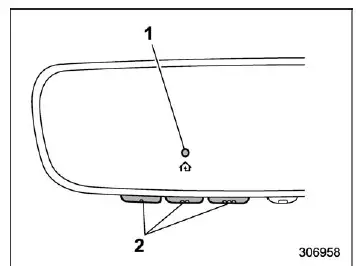
- Indicator Light
- HomeLink Buttons
1. Begin the programming process in your Subaru Ascent by pressing and releasing the HomeLink button you wish to assign. The indicator light will start flashing orange slowly, confirming that the system has entered programming mode. If the light does not flash, refer to the procedure for erasing previously stored HomeLink settings before continuing.
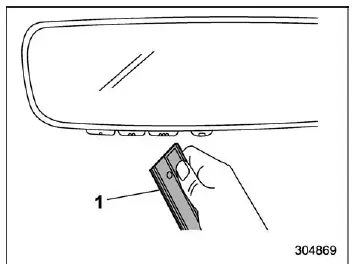
- Garage door opener remote
2. Hold your handheld remote control (such as a garage door opener) approximately 1 to 3 inches (2 to 8 cm) away from the HomeLink button in your Subaru Ascent. Proper positioning is important to ensure accurate signal transmission during programming.
NOTE
In certain cases, better results may be achieved by increasing the distance to approximately 6 to 12 inches (15 to 30 cm). If initial programming attempts are unsuccessful, adjust the distance and repeat the process.
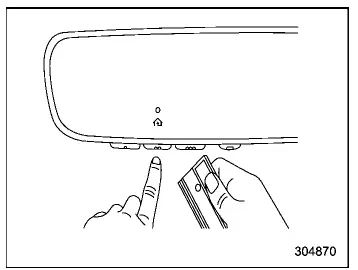
3. While the HomeLink indicator light is flashing orange, press and hold the button on your handheld remote. Continue holding the button until the indicator light on the Subaru Ascent changes from orange to a steady green. This change confirms that the signal has been successfully learned, and you may release the remote button.
NOTE
Some devices, particularly gate operators or systems used in Canada, may require alternative programming procedures. In such cases, refer to the specific instructions provided for those systems.
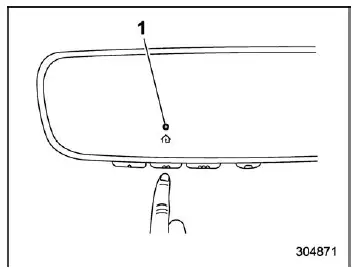
- Indicator Light
4. Press the programmed HomeLink button inside your Subaru Ascent and observe the behavior of the indicator light to verify proper setup.
- If the indicator light remains solid green, the programming process has been successfully completed and your connected device should operate immediately when the button is pressed.
- If the indicator light flashes rapidly in green, press and hold the HomeLink button for two seconds and release it. Repeat this sequence up to three times. If the device begins to operate, the setup is complete. If not, proceed to the next step to finalize synchronization.
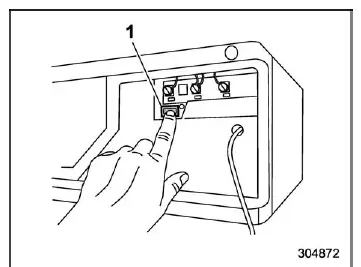
- "Learn" button
5. Locate the "Learn", "Smart", or "Program" button on your garage door opener or gate motor unit. In most cases, this button is positioned near the antenna wire on the motor housing. The exact location and appearance may vary depending on the manufacturer, so consult the device manual if needed.
NOTE
Using a ladder or having an assistant nearby can make this step safer and more convenient, especially when accessing ceiling-mounted garage door openers.
6. Press and release the "Learn", "Smart", or "Program" button on the motor unit. Once activated, you will have approximately 30 seconds to complete the next step.
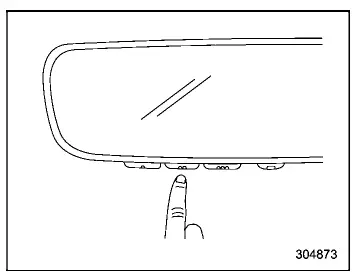
7. Return to your Subaru Ascent and press the programmed HomeLink button. Hold it for about two seconds and release. Repeat this action up to three times if necessary. Once synchronization is complete, your garage door or gate system should respond immediately when the HomeLink button is used.
Using the integrated HomeLink system in the Subaru Ascent simplifies everyday routines by allowing direct control of home automation features without relying on separate remotes. Keeping the system properly programmed and updated ensures reliable operation and added convenience for daily driving.
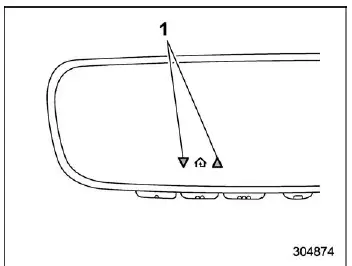
- Status Indicators
8. If directional arrows or status indicators appear next to the HomeLink indicator light in your Subaru Ascent, this means that the system is capable of receiving feedback from a compatible device. In such cases, refer to the section describing two-way communication with garage door systems for a more detailed explanation of these signals and their meaning.
If you continue to experience difficulties while programming the HomeLink system in your Subaru Ascent, or if any questions arise during setup, you can access detailed instructions, troubleshooting guidance, and instructional videos online at www.HomeLink.com and www.youtube.com/HomeLinkGentex. For specific compatibility with Genie or Sommer garage door openers, it is recommended to consult the official HomeLink website directly for the most accurate and up-to-date procedures.
Gate Operator/Canadian Programming
Due to Canadian radio-frequency regulations, certain remote transmitters automatically stop transmitting after a short period of time. This built-in limitation may prevent the Subaru Ascent HomeLink system from receiving a continuous signal long enough to complete programming. Similarly, some gate operators in the United States are designed with the same timed signal cutoff behavior.
When the handheld remote stops transmitting, its indicator LED will turn off, signaling the end of the transmission cycle.
If you are located in Canada or encounter programming issues with a gate operator or garage door opener in your Subaru Ascent, modify step 3 of the standard programming procedure as follows: while the HomeLink indicator light is flashing orange, repeatedly press and release (cycle) the handheld remote button every two seconds. Continue this process until the HomeLink indicator changes from orange to green, indicating successful signal learning. At that point, release the remote button.
NOTE
When performing this cycling procedure, it is advisable to temporarily disconnect the garage door opener or gate operator to avoid overheating or excessive operation during repeated signal transmission.
After completing this adjustment, proceed with step 4 of the standard HomeLink programming procedure in your Subaru Ascent to finalize the setup.
Using HomeLink
Operating the HomeLink system in the Subaru Ascent is straightforward and intuitive. Simply press and release the programmed HomeLink button, and the linked device will activate immediately.
This functionality allows convenient control over a wide range of systems, including garage doors, automatic gates, security systems, entry locks, and even home or office lighting. For added flexibility, the original handheld remote can still be used whenever necessary.
Erasing HomeLink Buttons
To completely clear all programmed HomeLink buttons in your Subaru Ascent (note that individual buttons cannot be erased separately), follow this procedure: press and hold the two outer HomeLink buttons simultaneously for at least 10 seconds. The LED indicator will transition from a steady light to a rapid flashing pattern. Once this change occurs, release both buttons.
Avoid holding the buttons for more than 20 seconds, as this is unnecessary and does not provide additional benefit.
After erasing, the HomeLink system in the Subaru Ascent is reset and ready to be programmed again starting from the initial setup procedure.
Reprogramming a Single HomeLink Button
To overwrite an existing HomeLink button with a new function in your Subaru Ascent, follow these steps:
1. Press and hold the selected HomeLink button without releasing it.
2. After approximately 20 seconds, the indicator light will begin flashing orange. At this moment, release the button and proceed with the standard programming process starting from step 3.
3. If no new programming sequence is completed, the button will automatically retain its previous function, ensuring that existing settings are not lost unintentionally.
Garage Door Two-Way Communication
The HomeLink system in the Subaru Ascent supports advanced two-way communication with compatible garage door openers, enhancing both awareness and convenience.
Through this feature, the system can receive and display real-time status updates such as whether the garage door is currently opening or closing.
Additionally, the Subaru Ascent can recall and show the most recent status transmitted by the garage door system, allowing the driver to quickly confirm whether the garage door is fully closed or remains open, even after leaving the location.
The integrated HomeLink functionality in the Subaru Ascent not only replaces traditional remotes but also introduces smarter interaction with home systems, improving daily usability and adding an extra layer of control directly from the vehicle interior.
In the Subaru Ascent, the HomeLink system is capable of receiving communication signals from a compatible garage door opener at distances of up to approximately 820 feet (250 meters), allowing convenient interaction even before reaching your home.
However, the effective operating range may vary depending on environmental conditions. Obstacles such as buildings, walls, trees, or other structures can reduce signal strength. In such situations, reducing vehicle speed while approaching your destination in the Subaru Ascent can help ensure more reliable communication with the garage door system.
Programming Two-Way Communication
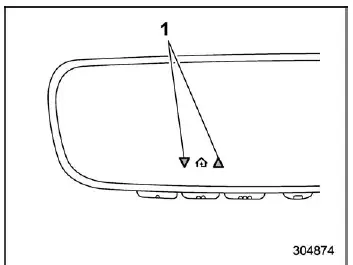
- Status Indicators
Within five seconds after successfully programming a new HomeLink button in your Subaru Ascent, both garage door status indicators will begin flashing rapidly in green. This confirms that two-way communication between the vehicle and the garage door opener has been successfully established.
If these indicators do not flash, the system may require additional setup steps or may not be compatible with two-way communication. In such cases, consult detailed resources and instructional materials available online at www.HomeLink.com or www.youtube.com/HomeLinkGentex for further assistance.
Using Two-Way Communication
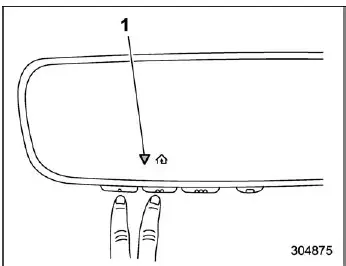
- Status Indicators
At any time, the Subaru Ascent allows you to retrieve the most recent garage door status message stored by the HomeLink system. To do this, press and hold HomeLink buttons 1 and 2 simultaneously for approximately two seconds. The system will then display the last recorded status for a short duration of about three seconds.
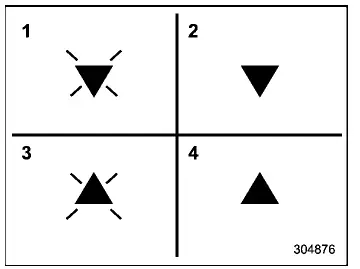
- Garage Door Opener CLOSING (Blinking Orange)
- Garage Door Opener CLOSED (Solid Green)
- Garage Door Opener OPENING (Blinking Orange)
- Garage Door Opener OPENED (Solid Green)
If the two-way communication feature in the Subaru Ascent has been properly configured, the system will visually indicate the current state of your garage door using directional arrows and color-coded signals, providing immediate confirmation without requiring direct line of sight.
Certification
If you continue to experience programming issues or require further clarification, additional support materials, step-by-step guides, and video tutorials are available at www.HomeLink.com and www.youtube.com/HomeLinkGentex. You may also contact the HomeLink support hotline at 1-800-355-3515 for direct assistance.
- U.S.-spec. models
CAUTION
FCC WARNING
Any unauthorized modifications or changes to the HomeLink system that are not explicitly approved by the responsible compliance authority may void the user's right to operate this equipment.
HomeLink and the HomeLink house symbol are registered trademarks of Gentex Corporation and are widely recognized for their integration in modern vehicles such as the Subaru Ascent.
WARNING
- When programming the HomeLink Wireless Control System in your Subaru Ascent, you may unintentionally activate a garage door or similar device. Always ensure that the area is clear of people, animals, and obstacles to prevent accidents or damage.
- Do not use the HomeLink system with garage door openers that do not include mandatory safety stop and reverse mechanisms. These features are essential to comply with modern safety regulations. Operating incompatible systems increases the risk of injury or serious incidents. For more details, visit www.homelink.com or contact support directly.
The Subaru Ascent integrates advanced HomeLink communication technology to deliver a seamless connection between your vehicle and home systems, improving everyday convenience while maintaining a high standard of operational safety and reliability.
 Mirrors
...
 Smart Rearview Mirror/compass with HomeLink
Safety precautions
WARNING
When driving the Subaru Ascent, never depend solely on the Smart Rearview
Mirror display. This system, although advanced, has inherent blind spots and
limitations ...
Other materials:
Read diagnostic trouble code (dtc) Operation
Blind Spot Detection/Rear Cross Traffic Alert (DIAGNOSTICS) > Read Diagnostic Trouble Code (DTC)OPERATION1. On «Start» display, select «Diagnosis».2. On «Vehicle selection» display, input the target vehicle information and select «Confirmed».3. On «Main Menu» display, select «Each Syst ...
Adjustment
CONTINUOUSLY VARIABLE TRANSMISSION(TR580) > Transmission CaseADJUSTMENTNOTE:When replacing the transmission case with a new part, perform the following check and adjustment for the selection.• Select the transfer driven gear shim. Transfer Clutch > ADJUSTMENT">• Select the ...
Select play mode
The play mode settings display will appear
when play mode key is touched. Select
the preferred play mode from the following
items.
Icon
Function
Touch to start 1 track repeat.
Touch to start repeat all.
Touch to start folder repeat.
T ...
