
Subaru Crosstrek Owners Manual: Sensor for the auto on/off headlights (if equipped)
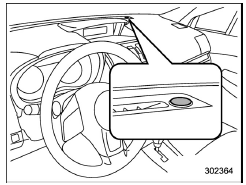
The sensor is on the instrument panel as shown in the illustration.
CAUTION
If any object is placed on or near the sensor, the sensor may not detect the level of the ambient light correctly and the auto on/off headlights may not operate properly.
 Welcome lighting function (if
equipped)
Welcome lighting function (if
equipped)
The welcome lighting function turns on the
low beam headlight for smooth approaching
to or exiting from the vehicle at night or
in a dark place.
The function is activated while all of the
follo ...
 High/low beam change (dimmer)
To change from low beam to high beam,
push the turn signal lever forward. When
the headlights are on high beam, the high
beam indicator light " " on
the combination
meter is also on.
...
Other materials:
Installation
HVAC SYSTEM (HEATER, VENTILATOR AND A/C) > CondenserINSTALLATIONCAUTION:• If the condenser assembly - air conditioner has been replaced, add an appropriate amount of compressor oil. Compressor Oil > ADJUSTMENT">• Replace the O-rings with new parts, and then apply compresso ...
Removal
SECURITY AND LOCKS > Starter Cut RelayREMOVALCAUTION:Before handling the airbag system components, refer to “CAUTION” of “General Description” in “AIRBAG SYSTEM”. General Description > CAUTION">1. Disconnect the ground cable from battery and wait fo ...
Dtc b1014 acc power
BODY CONTROL SYSTEM (DIAGNOSTICS) > Diagnostic Procedure with Diagnostic Trouble Code (DTC)DTC B1014 ACC POWERDTC detecting condition:Voltage failure caused by poor contact of ACC power supply circuitTrouble symptom:DRL may not illuminate.Wiring diagram:Shift lock control system Shift Lock Contr ...
