
Subaru Crosstrek Owners Manual: Headlights
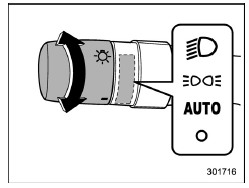
To turn on the headlights, turn the knob on the end of the turn signal lever.
" " position
Instrument panel illumination, headlights, parking lights, front side marker lights, rear side marker lights, tail lights and license plate lights are on.
" " position
Instrument panel illumination, parking lights, front side marker lights, rear side marker lights, tail lights and license plate lights are on.
"  " position: auto on/off
headlights (if
equipped)
" position: auto on/off
headlights (if
equipped)
When the ignition switch is in the "ON" position, the instrument panel illumination, headlights, parking lights, front side marker lights, rear side marker lights, tail lights and license plate lights are automatically on or off depending on the level of the ambient light.
"  " position
The headlights are all off.
NOTE
The sensitivity of the auto on/off headlights can be changed by a SUBARU dealer. Consult your SUBARU dealer for details. Also, for models with a multi function display, the setting can be changed using the display. For details, refer to "Auto light sensor sensitivity setting"
 Light control switch
CAUTION
Use of any lights for a long period
of time while the engine is not
running can cause the battery to
discharge.
Before leaving the vehicle, make
sure that the lights are turned o ...
 Welcome lighting function (if
equipped)
Welcome lighting function (if
equipped)
The welcome lighting function turns on the
low beam headlight for smooth approaching
to or exiting from the vehicle at night or
in a dark place.
The function is activated while all of the
follo ...
Other materials:
Removal
REAR SUSPENSION > Rear Shock AbsorberREMOVAL1. CROSSTREK MODEL1. Disconnect the ground cable from battery. NOTE">2. Lift up the vehicle, and then remove the rear wheels.3. Remove the sensor assembly - headlight beam leveler. (Model with auto headlight beam leveler, left side only)CAUTION ...
Vehicle finder function
Use this function to find your vehicle
parked among many vehicles in a large
parking lot. Provided you are within 30 feet
(10 meters) of the vehicle, pressing the
lock/arm button three times in a 5-second
period will cause your vehicle's horn to
sound once and its hazard warning flashers to fl ...
Removal
HVAC SYSTEM (HEATER, VENTILATOR AND A/C) > Evaporator SensorREMOVALCAUTION:Before handling the airbag system components, refer to “CAUTION” of “General Description” in “AIRBAG SYSTEM”. General Description > CAUTION">1. Using the refrigerant recovery ...
