
Subaru Crosstrek Service Manual: Removal
SECURITY AND LOCKS > Push Button Ignition Switch
REMOVAL
CAUTION:
Before handling the airbag system components, refer to “CAUTION” of “General Description” in “AIRBAG SYSTEM”. General Description > CAUTION">
1. Disconnect the ground cable from battery and wait for at least 60 seconds before starting work. NOTE">
2. Remove the cover assembly - instrument panel LWR driver. Instrument Panel Lower Cover > REMOVAL">
3. Remove the knee airbag module. Knee Airbag Module > REMOVAL">
4. Remove the push button ignition switch.
(1) Disconnect the connector, and remove the aspirator hose.
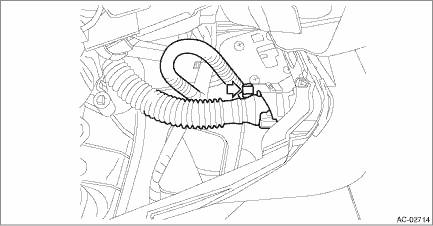
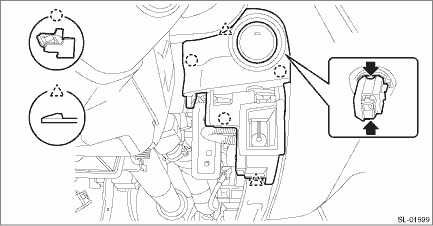
(2) Release the claws, and then remove the panel - switch.
(3) Release the claws, and then remove the push button ignition switch from the panel - switch.
 Inspection
SECURITY AND LOCKS > Push Button Ignition SwitchINSPECTION1. Check the continuity between push button ignition switch terminals.Preparation tool:Circuit testerTerminal No.Inspection conditionsSpeci ...
 Installation
SECURITY AND LOCKS > Push Button Ignition SwitchINSTALLATIONCAUTION:Before handling the airbag system components, refer to “CAUTION” of “General Description” in “AIRBA ...
Other materials:
Engine wiring harness and transmission cord Location
WIRING SYSTEM > Engine Wiring Harness and Transmission CordLOCATIONConnectorConnecting toNo.PoleColorAreaNo.DescriptionE254BlackA-3B21Bulkhead wiring harnessE316BrownA-3B22E42BlueB-4 Purge control solenoid valveE52Dark grayB-2 Fuel injector No. 1E62Dark grayA-2 Fuel injector No. 3E82BlackB-2 Engi ...
Help line
The help line (distance marker and vehicle
width line) is a guide to help you realize
the actual distance from the screen image.
1) Vehicle width line (oblique vertical line)
2) Approx. 10 feet (3 m) from the bumper
(green horizontal line)
3) Approx. 3 feet (1 m) from the bumper
(yellow hor ...
Windshield wipers
Mist (for a single wipe)
Off
Intermitten
Low speed
High speed
To turn the wipers on, push the wiper
control lever down.
To turn the wipers off, return the lever to
the " " position.
For a single wipe of the wipers, push the
lever up. The wipers operate until you
release the lever. ...
