
Subaru Crosstrek Service Manual: Inspection
SECURITY AND LOCKS > Push Button Ignition Switch
INSPECTION
1. Check the continuity between push button ignition switch terminals.
Preparation tool:
Circuit tester
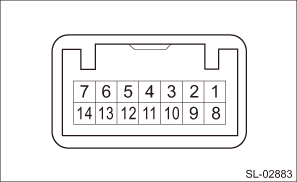
Terminal No. | Inspection conditions | Specification |
4 (COM) — 5 (GND) | Always | Continuity exists |
7 (SSW1) — 5 (GND) | Push button ignition switch released > pressed | Continuity exists |
2 (SSW2) — 5 (GND) | Push button ignition switch released > pressed | Continuity exists |
2. Check the push button ignition switch operation when battery voltage is applied between the terminals of the push button ignition switch.
Terminal No. | Inspection conditions | Specification |
11 (SWIL) — 5 (GND) | Connect battery to the terminals | Goes off > Red switch illumination light |
12 (INDS) — 5 (GND) | Turns off > Switch indicator lights in green | |
13 (INDW) — 5 (GND) | Turns off > Switch indicator lights in orange |
3. Replace the push button ignition switch if the inspection result is not within the standard value.

 Removal
SECURITY AND LOCKS > Push Button Ignition SwitchREMOVALCAUTION:Before handling the airbag system components, refer to “CAUTION” of “General Description” in “AIRBAG SYS ...
Other materials:
Waveform
CONTINUOUSLY VARIABLE TRANSMISSION (DIAGNOSTICS) > Transmission Control Module (TCM) I/O SignalWAVEFORM1. SENSOR2. SOLENOID ...
Dtc b2275 engine start request control circuit
KEYLESS ACCESS WITH PUSH BUTTON START SYSTEM (DIAGNOSTICS) > Diagnostic Procedure with Diagnostic Trouble Code (DTC)DTC B2275 ENGINE START REQUEST CONTROL CIRCUITDTC detecting condition:• When malfunction is detected in engine start permission signal output circuit in the keyless access CM. ...
Removal
CONTINUOUSLY VARIABLE TRANSMISSION(TR580) > Transmission HarnessREMOVAL1. INHIBITOR HARNESS1. Remove the transmission from the vehicle. Automatic Transmission Assembly > REMOVAL">2. Remove the transmission case cover.3. Remove the harness connector from the ground terminal, turbine sp ...
