
Subaru Crosstrek Service Manual: Removal
SECURITY AND LOCKS > Keyless Access Indoor Antenna
REMOVAL
1. FRONT ANTENNA
1. Disconnect the ground cable from battery. NOTE">
2. Remove the cover - shift lever. Console Box > REMOVAL">
3. Disconnect the connector and remove the front antenna assembly - interior.
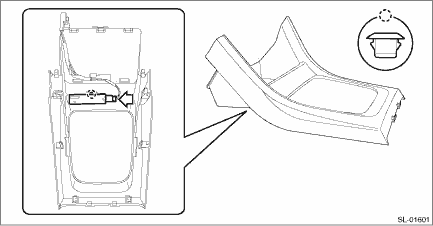
2. REAR ANTENNA
1. Disconnect the ground cable from battery. NOTE">
2. Remove the rear seat cushion assembly. Rear Seat > REMOVAL">
3. Remove the rear antenna assembly - interior.
NOTE:
Do not remove the antenna assembly from the cover. If removed, the antenna assembly and cover mounting becomes loose, causing abnormal noises.
(1) Disconnect the connector.
(2) Remove the screw, and remove the rear antenna assembly - interior.
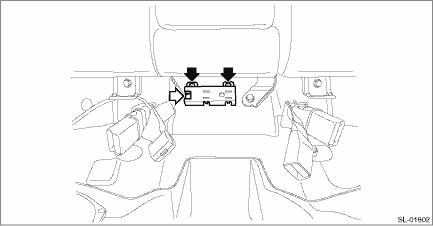
 Inspection
SECURITY AND LOCKS > Keyless Access Indoor AntennaINSPECTION1. Check the setting by performing Keyless access system check using the Subaru Select Monitor. Keyless Access System Check > OPERATI ...
 Installation
SECURITY AND LOCKS > Keyless Access Indoor AntennaINSTALLATIONInstall each part in the reverse order of removal. ...
Other materials:
Map lights
Type A
Type B
To turn on the map light, push the switch.
To turn it off, push the switch again.
NOTE
For the type A map lights, although the
light switches are in the ON position,
the lights are automatically turned off
after approximately 30 seconds of
illumination to prevent the veh ...
Electronic Brake Force Distribution
(EBD) system warning
The brake system warning light also
illuminates if a malfunction occurs in the
EBD system. In that event, it illuminates
together with the ABS warning light.
The EBD system may be malfunctioning if
the brake system warning light and ABS
warning light illuminate simultaneously
during driving ...
Phone volume settings
The call and ringtone volume can be
adjusted. A ringtone can be selected.
1. Display the "PHONE" screen. Refer to
"How to change the hands-free phone
system" F5-73.
2. Touch the key.
3. Select the desired item to be set.
On the "PHONE" screen, the screen
changes to the "Options" s ...
