
Subaru Crosstrek Owners Manual: Map lights
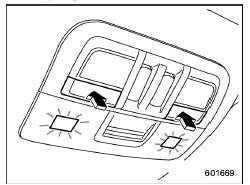
Type A
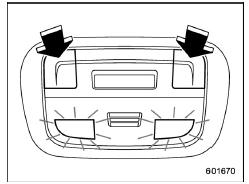
Type B
To turn on the map light, push the switch.
To turn it off, push the switch again.
NOTE
For the type A map lights, although the light switches are in the ON position, the lights are automatically turned off after approximately 30 seconds of illumination to prevent the vehicle battery from discharging. For details, refer to "Battery drainage prevention function"
Automatic illumination (models with moonroof)
The map lights illuminate automatically in the following cases.
- Any of the doors other than the rear gate is opened. (The map lights do not illuminate when only the rear gate is opened.)
- The doors are unlocked using the
keyless access function (if equipped).
Refer to "Locking and unlocking with "keyless access" entry function"
- The doors are unlocked using the remote keyless entry system. Refer to "Remote keyless entry system"
- The ignition switch is turned from the "ACC" position to the "LOCK"/"OFF" position.
 Cargo area light
DOOR
OFF
DOOR: The light illuminates when the rear
gate is opened. The light remains illuminated
for several seconds and gradually
turns off after the rear gate is closed.
OFF: The l ...
 OFF delay timer
The following lights have an automatic
illumination function.
dome light
map light (type A)
cargo area light
After being illuminated automatically,
these lights remain on for several seco ...
Other materials:
Removal
GLASS/WINDOWS/MIRRORS > Windshield GlassREMOVAL1. USING WINDSHIELD GLASS KNIFECAUTION:• For model with EyeSight, always remove the glass - front window after the stereo camera is removed.• For model with EyeSight, always use Subaru genuine windshield glass specially designed for EyeSi ...
Subaru select monitor Operation
CRUISE CONTROL SYSTEM (DIAGNOSTICS) > Subaru Select MonitorOPERATION1. GENERAL DESCRIPTIONThe on-board diagnosis function of the cruise control system uses Subaru Select Monitor.The on-board diagnosis function operates in two categories, which are used depending on the type of problems;1. Cruise ...
Inspection
Blind Spot Detection/Rear Cross Traffic Alert (DIAGNOSTICS) > Subaru Select MonitorINSPECTION1. COMMUNICATION FOR INITIALIZING IMPOSSIBLEWhen communication with the radar sensor is impossibleDetecting condition:• Defective harness connector• Power supply circuit malfunction• Def ...
