
Subaru Crosstrek Service Manual: Removal
MECHANICAL(H4DO) > Crank Pulley
REMOVAL
NOTE:
When replacing a single part, perform the work with the engine assembly installed to body.
1. When working on the vehicle
NOTE:
When working on the vehicle, perform the following steps also.
(1) Remove the radiator main fan & fan motor assembly and radiator sub fan & fan motor assembly. Radiator Main Fan and Fan Motor > REMOVAL"> Radiator Sub Fan and Fan Motor > REMOVAL">
2. Remove the V-belts. V-belt > REMOVAL">
3. Use the ST to lock the crank pulley, and remove the crank pulley bolt.
NOTE:
To prevent damaging ST1, attach the ST2 onto the ST1 as shown.
| ST1 18355AA000 | PULLEY WRENCH |
| ST2 18334AA000 | PULLEY WRENCH PIN SET |
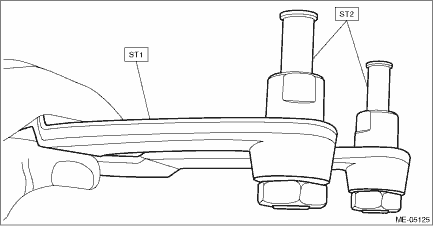
| ST1 18355AA000 | PULLEY WRENCH |
| ST2 18334AA000 | PULLEY WRENCH PIN SET |
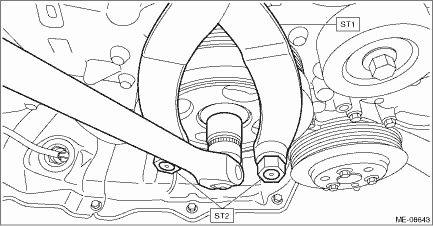
4. Remove the crank pulley.
5. Remove the front oil seal.
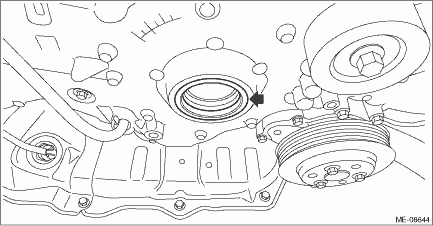
 Inspection
MECHANICAL(H4DO) > Crank PulleyINSPECTION1. Check that the crank pulley has no deformation, cracks or other damages.2. Inspect for oil leakage from the front oil seal. If there is an oil leak, repl ...
 Installation
MECHANICAL(H4DO) > Crank PulleyINSTALLATION1. Degrease the press-fit section for the chain cover front oil seal, and install the front oil seal to the chain cover using ST.CAUTION:Do not apply flui ...
Other materials:
Dtc c1351 normal opening valve 1
VEHICLE DYNAMICS CONTROL (VDC) (DIAGNOSTICS) > Diagnostic Procedure with Diagnostic Trouble Code (DTC)DTC C1351 NORMAL OPENING VALVE 1NOTE:For the diagnostic procedure, refer to “DTC C1362 NORMAL CLOSING VALVE 2”. Diagnostic Procedure with Diagnostic Trouble Code (DTC) > DTC C1362 ...
Continuously variable transmission features
The continuously variable transmission is
electronically controlled and provides an
infinite number of forward speeds and 1
reverse speed. It also has a manual mode.
NOTE
When the engine coolant temperature
is still low, the transmission will
upshift or downshift at higher engine
speed ...
Disassembly
BRAKE > Rear Disc Brake AssemblyDISASSEMBLYCAUTION:Be careful not to allow foreign matter to enter the brake hose connector.1. Remove mud and foreign matter from the caliper body assembly.2. Remove the piston boot from caliper body cylinder.3. Remove the piston - disc brake.(1) Place a wooden blo ...
