
Subaru Crosstrek Service Manual: Removal
MANUAL TRANSMISSION AND DIFFERENTIAL(5MT) > Transfer Case and Extension Case Assembly
REMOVAL
1. Remove the manual transmission assembly from the vehicle. Manual Transmission Assembly > REMOVAL">
2. Remove the back-up light switch and the neutral position switch. Switches and Harness > REMOVAL">
3. Remove the transfer case together with the extension case assembly.
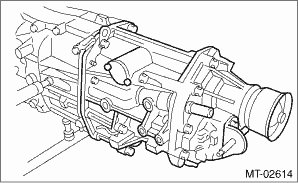
4. Remove the gasket.
5. Remove the shifter arm.
6. Remove the extension case assembly.
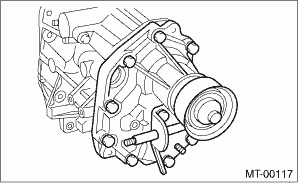
7. Remove the transfer driven gear.
8. Remove the taper roller bearing (extension case side) outer race, dish plate and adjusting washer.
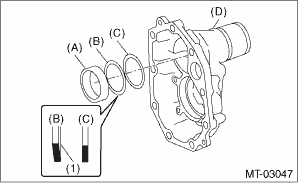
(A) | Taper roller bearing (extension case side) outer race |
(B) | Dish plate |
(C) | Adjusting washer |
(D) | Extension case |
(1) | Paint side |
 Assembly
MANUAL TRANSMISSION AND DIFFERENTIAL(5MT) > Transfer Case and Extension Case AssemblyASSEMBLY1. EXTENSION CASE1. Using the ST, install the oil seal to the extension case. Oil Seal">NOTE:Us ...
 Disassembly
MANUAL TRANSMISSION AND DIFFERENTIAL(5MT) > Transfer Case and Extension Case AssemblyDISASSEMBLY1. TRANSFER CASE1. Remove the reverse check sleeve assembly. Reverse Check Sleeve > REMOVAL" ...
Other materials:
Installation
ENTERTAINMENT > Data Communication ModuleINSTALLATION1. DATA COMMUNICATION MODULECAUTION:• After installing the center grille assembly, check that the air vent grille of the center grille assembly is inserted correctly into the air vent duct.• Before handling the airbag system compone ...
Safety tips regarding the BSD/RCTA approach indicator light/warning buzzer
In the following cases, operation of the
BSD/RCTA approach indicator light and
the warning buzzer may be delayed or the
system may fail to issue these warnings.
When a vehicle moves to the
neighboring lane from a lane next to
the neighboring lane
When driving on a steep incline or
on ...
Installation
SECURITY AND LOCKS > IG Relay2 (Push Button Start)INSTALLATIONCAUTION:Before handling the airbag system components, refer to “CAUTION” of “General Description” in “AIRBAG SYSTEM”. General Description > CAUTION">Install each part in the reverse order ...
