
Subaru Crosstrek Service Manual: Assembly
MANUAL TRANSMISSION AND DIFFERENTIAL(5MT) > Transfer Case and Extension Case Assembly
ASSEMBLY
1. EXTENSION CASE
1. Using the ST, install the oil seal to the extension case. Oil Seal">
NOTE:
Use a new oil seal.
2. Install the dust cover.
3. Install the shift bracket.
Tightening torque:
24.5 N·m (2.5 kgf-m, 18.1 ft-lb)
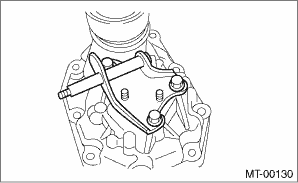
4. Install the transfer drive gear to the extension case. Transfer Drive Gear > INSTALLATION">
2. TRANSFER CASE
1. Set the ST1, ST2, iron plate and the transfer case to the press.
NOTE:
• Set the ST2 under ST1.
• Set the transfer case so that the hole for shifter arm is positioned vertically.
• Insert the iron plate which is thicker than the exposed length of the transfer case knock pin between the ST and transfer case.
• Set the iron plate so that the transfer case knock pin does not ride on the iron plate.
| ST1 498267300 | CYLINDER HEAD TABLE |
| ST2 498267200 | CYLINDER HEAD TABLE |
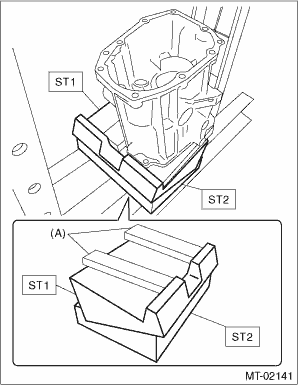
(A) | Iron plate |
2. Press-fit the roller bearing using the ST.
Press-fit depth of roller bearing:
A: 0±0.2 mm (0±0.01 in) from the end of transfer case
| ST 899864100 | REMOVER |
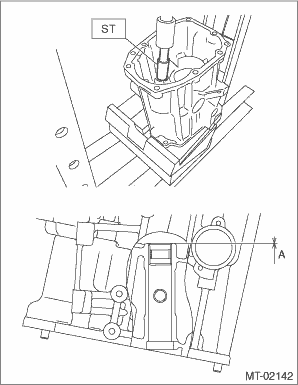
3. Remove the iron plate, and turn over the transfer case.
NOTE:
Set the transfer case so that the hole for shifter arm is positioned vertically.
4. Press-fit the roller bearing using the ST.
Press-fit depth of roller bearing:
A: 0±0.2 mm (0±0.01 in) from the end of transfer case
| ST 899864100 | REMOVER |
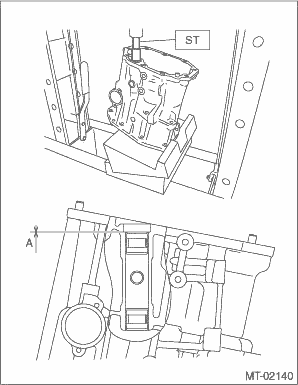
5. Install the shifter arm to the transfer case, and make sure that the shift arm moves smoothly.
6. Install the oil guide.
NOTE:
Use a new installing bolt.
Tightening torque:
6.4 N·m (0.7 kgf-m, 4.7 ft-lb)
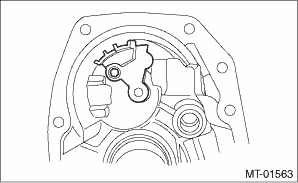
7. Install the reverse check sleeve assembly to the transfer case. Reverse Check Sleeve > INSTALLATION">
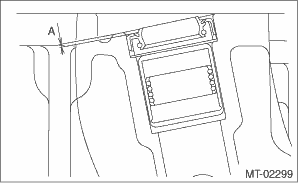
8. Install the oil seal.
NOTE:
Use a new oil seal.
Press-fit depth of oil seal:
A: 1±0.2 mm (0.04±0.01 in) from the end of transfer case

 Removal
MANUAL TRANSMISSION AND DIFFERENTIAL(5MT) > Transfer Case and Extension Case AssemblyREMOVAL1. Remove the manual transmission assembly from the vehicle. Manual Transmission Assembly > REMOVAL&q ...
Other materials:
Dtc u0164 lost communication with hvac control module
INSTRUMENTATION/DRIVER INFO (DIAGNOSTICS) > Diagnostic Procedure with Diagnostic Trouble Code (DTC)DTC U0164 LOST COMMUNICATION WITH HVAC CONTROL MODULEDetected when CAN data is not received from A/C CM.NOTE:Perform the diagnosis for LAN system. Basic Diagnostic Procedure > PROCEDURE"> ...
Removal
EMISSION CONTROL (AUX. EMISSION CONTROL DEVICES)(H4DO) > PCV ValveREMOVALCAUTION:Do not remove unless the PCV valve is broken.1. Disconnect the PCV hose from the intake manifold and the PCV valve, and then remove the PCV hose.2. Remove the clip (A) holding the air breather hose from the engine ha ...
Help line
The help line (distance marker and vehicle
width line) is a guide to help you realize
the actual distance from the screen image.
1) Vehicle width line (oblique vertical line)
2) Approx. 10 feet (3 m) from the bumper
(green horizontal line)
3) Approx. 3 feet (1 m) from the bumper
(yellow hor ...
