
Subaru Crosstrek Service Manual: Removal
LIGHTING SYSTEM > Turn Signal Light & Hazard Light Unit
REMOVAL
CAUTION:
Before handling the airbag system components, refer to “CAUTION” of “General Description” in “AIRBAG SYSTEM”. General Description > CAUTION">
1. Disconnect the ground cable from battery and wait for at least 60 seconds before starting work. NOTE">
2. Remove the instrument panel lower cover. Instrument Panel Lower Cover > REMOVAL">
3. Remove the knee airbag module. Knee Airbag Module > REMOVAL">
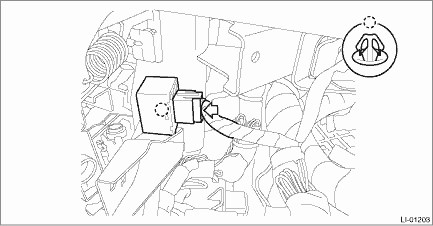
4. Remove the turn signal & hazard unit.
(1) Disconnect the connector.
(2) Release the claws and remove the turn signal & hazard unit from the beam COMPL - steering.
 Inspection
LIGHTING SYSTEM > Turn Signal Light & Hazard Light UnitINSPECTION1. Disconnect the connector of the turn signal & hazard unit.2. Measure the voltage between the turn signal & hazard uni ...
 Installation
LIGHTING SYSTEM > Turn Signal Light & Hazard Light UnitINSTALLATIONCAUTION:Before handling the airbag system components, refer to “CAUTION” of “General Description” in & ...
Other materials:
Towing hooks and tie-down hooks/holes
The towing hooks on the Subaru Ascent are intended strictly for emergency use
and should not be used for prolonged or improper towing operations.
CAUTION
Always use only the designated towing hooks and tie-down points. Do not attach
towing equipment to suspension components or other body parts ...
Installation
CLUTCH SYSTEM > Clutch Pipe and HoseINSTALLATIONInstall in the reverse order of removal.NOTE:Bleed air from brake fluid. Clutch Fluid Air Bleeding">Tightening torque:T1: 15 N·m (1.5 kgf-m, 11.1 ft-lb)T2: 18 N·m (1.8 kgf-m, 13.3 ft-lb)T3: 25 N·m (2.5 kgf-m, 18.4 ft-lb ...
Installation
SECURITY AND LOCKS > Starter Cut RelayINSTALLATIONCAUTION:Before handling the airbag system components, refer to “CAUTION” of “General Description” in “AIRBAG SYSTEM”. General Description > CAUTION">Install each part in the reverse order of removal. ...
