
Subaru Crosstrek Service Manual: Removal
IGNITION(H4DO) > Spark Plug
REMOVAL
Spark plug:
Refer to “SPECIFICATION” for spark plug. General Description > SPECIFICATION">
1. RH SIDE
1. Disconnect the ground cable from battery. NOTE">
2. Remove the air cleaner case. Air Cleaner Case > REMOVAL">
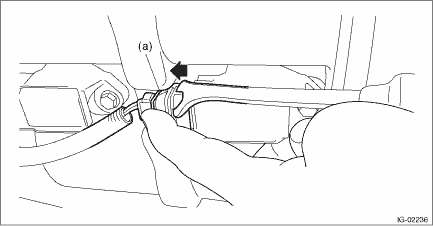
3. Disconnect the connector from ignition coil.
NOTE:
While pressing the spring (a) shown in the figure, slide it in the direction of the arrow with a clip remover.
4. Remove the ignition coil.
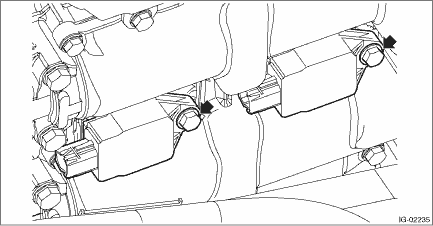
5. Remove the spark plug with a spark plug socket.
2. LH SIDE
1. Disconnect the ground cable from battery. NOTE">
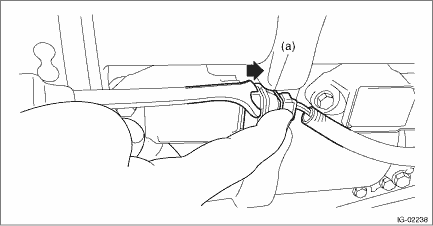
2. Disconnect the connector from ignition coil.
NOTE:
While pressing the spring (a) shown in the figure, slide it in the direction of the arrow with a clip remover.
3. Remove the ignition coil.
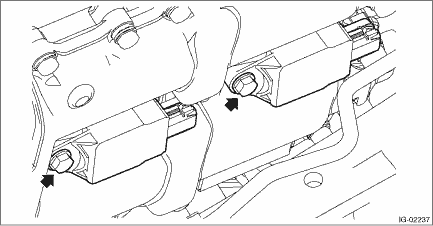
4. Remove the spark plug with a spark plug socket.
 Inspection
IGNITION(H4DO) > Spark PlugINSPECTION1. Check the spark plug for abnormalities. If defective, replace the spark plug.(A)Terminal damage(B)Crack or damage in insulator(C)Damaged gasket2. Check the s ...
 Installation
IGNITION(H4DO) > Spark PlugINSTALLATION1. RH SIDEInstall in the reverse order of removal.CAUTION:Degrease the ignition coil installation portion and the mounting bolts.Tightening torque:Spark plug1 ...
Other materials:
Installation
SEATS > Seat Heater SystemINSTALLATIONCAUTION:• If the cover - front cushion is removed, make sure to replace the hang wire on the cover - front cushion side with a new wire.• When replacing the seat cover, be careful not to damage the occupant detection sensor while installing the ho ...
Real-time diagnosis Operation
EyeSight (DIAGNOSTICS) > Real-time DiagnosisOPERATION1. On «Start» display, select «Diagnosis».2. On «Vehicle selection» display, input the target vehicle information and select «Confirmed».3. On «Main Menu» display, select «Each System».4. On «Select System» display, select «EyeSi ...
Dtc b1015 key interlock circuit
BODY CONTROL SYSTEM (DIAGNOSTICS) > Diagnostic Procedure with Diagnostic Trouble Code (DTC)DTC B1015 KEY INTERLOCK CIRCUITDTC detecting condition:Ground short of key interlock circuitTrouble symptom:Key interlock does not keep lock condition.Wiring diagram:Shift lock control system Shift Lock Co ...
