
Subaru Crosstrek Service Manual: Removal
EXTERIOR BODY PANELS > Door Sash Tape
REMOVAL
1. FRONT DOOR
1. Disconnect the ground cable from battery and wait for at least 60 seconds before starting work. NOTE">
2. Remove the trim panel - front door. Door Trim > REMOVAL">
3. Remove the outer mirror assembly. Outer Mirror Assembly > REMOVAL">
4. Remove the sealing cover - front door. Front Sealing Cover > REMOVAL">
5. Remove the glass assembly - front door. Front Door Glass > REMOVAL">
6. Remove the running channel - front door.
7. Remove the weather strip outer - front door.
CAUTION:
• When removing the weather strip outer, be careful not to damage the vehicle.
• Do not reuse the weather strip outer. Always replace with a new part.
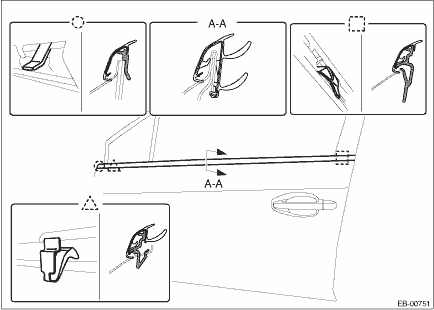
8. Peel the door sash tape from the door sash.
NOTE:
• If the tape is difficult to remove, warm the tape with a hairdryer, etc. to make the removal easier.
Use a household hairdryer. Do not use industrial dryers.
• If tape residue is remaining on the door sash, wipe clean.
2. REAR DOOR
1. Disconnect the ground cable from battery. NOTE">
2. Remove the trim panel - rear door. Door Trim > REMOVAL">
3. Remove the sealing cover - rear door. Rear Sealing Cover > REMOVAL">
4. Remove the glass assembly - rear door. Rear Door Glass > REMOVAL">
5. Remove the running channel - rear door.
6. Remove the weather strip outer - rear door.
CAUTION:
• When removing the weather strip outer, be careful not to damage the vehicle.
• Do not reuse the weather strip outer. Always replace with a new part.
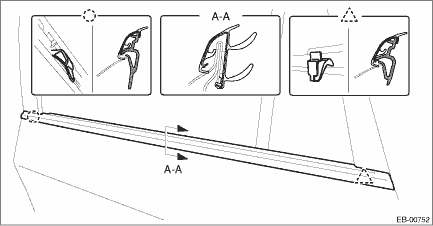
7. Peel the door sash tape from the door sash.
NOTE:
• If the tape is difficult to remove, warm the tape with a hairdryer, etc. to make the removal easier.
Use a household hairdryer. Do not use industrial dryers.
• If tape residue is remaining on the door sash, wipe clean.
 Installation
EXTERIOR BODY PANELS > Door Sash TapeINSTALLATIONCAUTION:• Do not reuse the removed door sash tape. Replace it with a new tape.• Press evenly along the sash when applying the tape using ...
 Front door
...
Other materials:
Rear wiring harness Location
WIRING SYSTEM > Rear Wiring HarnessLOCATIONConnectorConnecting toNo.PoleColorAreaNo.DescriptionR120C-1B97Bulkhead wiring harnessR320C-3B99R41BlackB-4 Parking brake switchR520C-3B92Bulkhead wiring harnessR93C-5 Front door switch LHR108B-5D22Rear door cord LHR123B-2 Front door switch RHR138B-3D28Re ...
Dtc b2a0c dcm internal fault
TELEMATICS SYSTEM (DIAGNOSTICS) > Diagnostic Procedure with Diagnostic Trouble Code (DTC)DTC B2A0C DCM INTERNAL FAULTDIAGNOSIS START CONDITION:When ignition switch is ON.DTC DETECTING CONDITION:• Main microcomputer and communication circuit IC cannot communicate. (Defective IPC)• SIM ...
Replacement
CONTINUOUSLY VARIABLE TRANSMISSION(TR580) > Differential Side Retainer Oil SealREPLACEMENTCAUTION:• Immediately after the vehicle has been running or after idling for a long time, the differential gear oil will be hot. Be careful not to burn yourself.• Be careful not to spill the diff ...
