
Subaru Crosstrek Service Manual: Removal
EMISSION CONTROL (AUX. EMISSION CONTROL DEVICES)(H4DO) > Leak Check Valve Assembly
REMOVAL
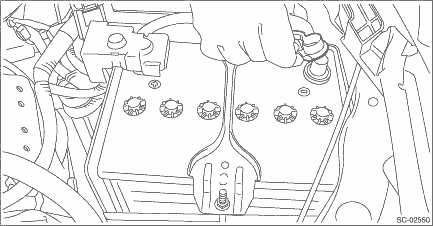
1. Disconnect the ground cable from battery.
2. Lift up the vehicle.
3. Remove the rear exhaust pipe. Rear Exhaust Pipe > REMOVAL">
4. Remove the propeller shaft. Propeller Shaft > REMOVAL">
5. Support the rear differential with the transmission jack.
6. Remove the self-locking nuts which hold the rear differential to the rear sub frame assembly.
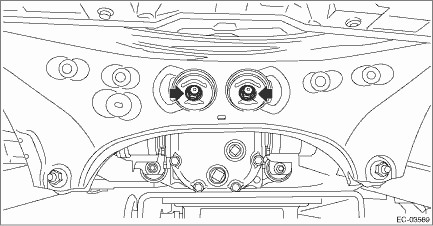
7. Remove the rear differential member from the rear sub frame assembly and the rear differential.
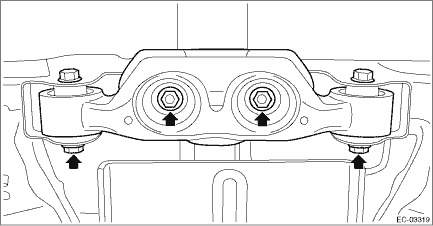
8. Lower the transmission jack gradually until the rear differential is at the position shown in the figure.
NOTE:
• When pulling out the stud bolt from the bushing portion of the rear sub frame assembly, adjust the angle and location of transmission jack and jack stand.
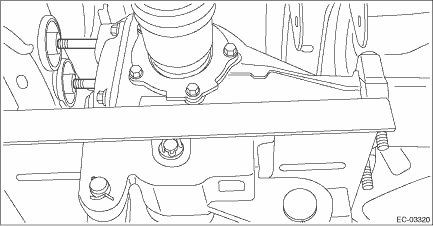
• Do not lower the rear differential excessively. Doing so may add extra load to the drive shaft or cause the falling-off of the drive shaft.
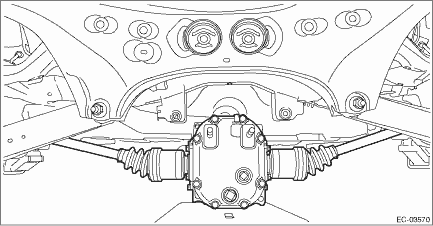
9. Disconnect the drain tube from the canister.
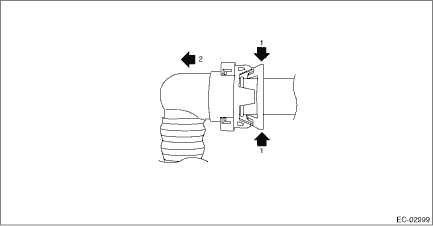
NOTE:
Disconnect the quick connector as shown in the figure.
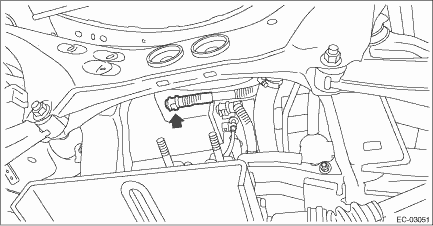
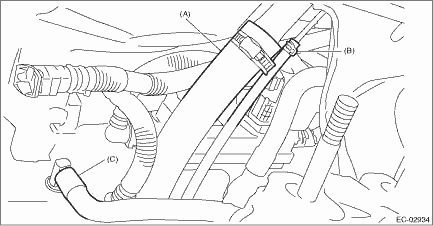
10. Disconnect the fuel filler hose (A) and evaporation hose (B).
11. Disconnect the intake hose (C) from the connector.
12. Disconnect the connector from the leak check valve assembly.
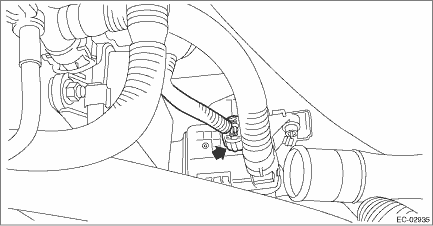
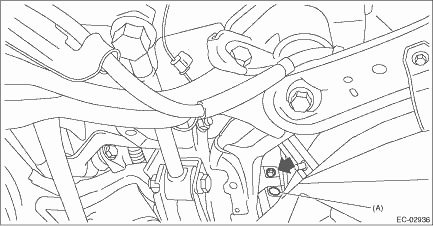
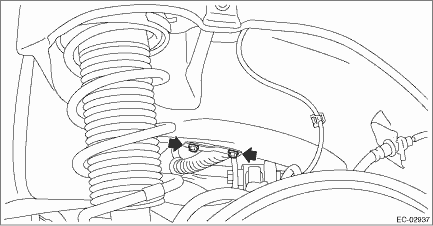
13. Remove the bolt and clip (A) which secure the leak check valve assembly to the vehicle, and remove the leak check valve assembly.
 Assembly
EMISSION CONTROL (AUX. EMISSION CONTROL DEVICES)(H4DO) > Leak Check Valve AssemblyASSEMBLY1. Install the bracket to the leak check valve assembly.Tightening torque:18 N·m (1.8 kgf-m, 13.3 ft ...
 Disassembly
EMISSION CONTROL (AUX. EMISSION CONTROL DEVICES)(H4DO) > Leak Check Valve AssemblyDISASSEMBLY1. Remove the drain separator from the leak check valve assembly. Drain Separator > REMOVAL"> ...
Other materials:
Removal
MANUAL TRANSMISSION AND DIFFERENTIAL(5MT) > Main Shaft AssemblyREMOVAL1. Remove the manual transmission assembly from the vehicle. Manual Transmission Assembly > REMOVAL">2. Remove the transfer case together with the extension case assembly. Transfer Case and Extension Case Assembly ...
Inspection
INSTRUMENTATION/DRIVER INFO (DIAGNOSTICS) > Subaru Select MonitorINSPECTION1. COMMUNICATION FOR INITIALIZING IMPOSSIBLE (COMBINATION METER)Detecting condition:• Defective harness connector• Power supply circuit malfunction• Defective combination meter• Defective CAN commun ...
Inspection locations after a collision Inspection
AIRBAG SYSTEM > Inspection Locations after a CollisionINSPECTIONIf the vehicle is involved in a collision, even if it is a slight collision, be sure to check the following systems.1. DRIVER’S AIRBAG MODULE ASSEMBLY1. Frontal collision (driver’s airbag module assembly activated)(1) Rep ...
