
Subaru Crosstrek Service Manual: Removal
DRIVE SHAFT SYSTEM > Front Hub Unit Bearing
REMOVAL
1. Lift up the vehicle, and then remove the front wheels.
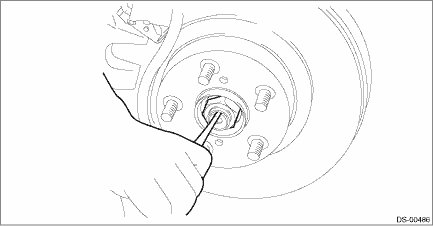
2. Remove the axle nut.
CAUTION:
Do not loosen the axle nut while the front axle is loaded. Doing so may damage the hub unit bearing.
(1) Lift the crimped section of axle nut.
(2) Remove the axle nut using a socket wrench while depressing the brake pedal.
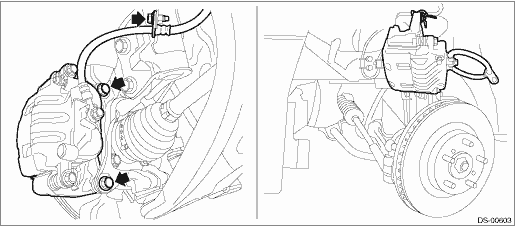
3. Remove the caliper body assembly from the front axle housing.
(1) Remove the mounting bolts and the brake hose bracket, and remove the caliper body assembly.
(2) Prepare wiring harnesses etc. to be discarded, and suspend the caliper body assembly from the strut assembly.
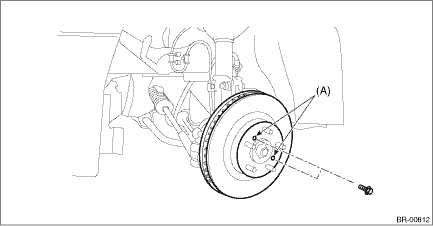
4. Remove the disc rotor.
NOTE:
When the disc rotor is difficult to be removed from the front hub unit bearing, screw in 8 mm (0.31 in) bolt to the threaded part of the disc rotor (A), and remove the disc rotor.
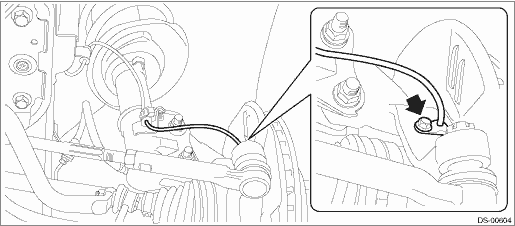
5. Remove the bolts, and remove the front ABS wheel speed sensor.
6. Remove the bolt from the front axle housing, and remove the front hub unit bearing.
CAUTION:
• Do not get closer the tool which charged magnetism to magnetic encoder.
• Be careful not to damage the magnetic encoder.
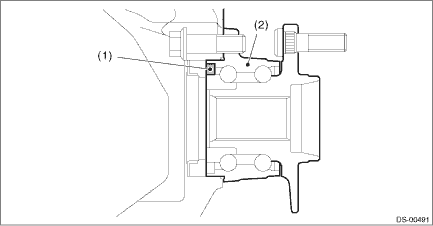
(1) | Magnetic encoder | (2) | Front hub unit bearing |
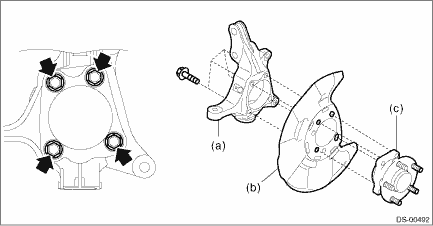
(a) | Front axle housing | (b) | Front brake back plate | (c) | Front hub unit bearing |
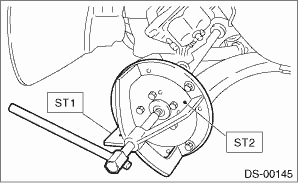
NOTE:
If it is hard to remove, use the ST.
Preparation tool:
ST1: AXLE SHAFT PULLER (926470000)
ST2: AXLE SHAFT PULLER PLATE (28099PA110)
 Assembly
DRIVE SHAFT SYSTEM > Front Hub Unit BearingASSEMBLY1. Install the hub unit bearing to the ST securely.Preparation tool:ST: HUB STAND (927080000)2. Using a press, press the new hub bolts (b) until t ...
 Disassembly
DRIVE SHAFT SYSTEM > Front Hub Unit BearingDISASSEMBLYUsing the ST or a hydraulic press, push out the hub bolt (b) from the front hub unit bearing (a).CAUTION:• Be careful not to hammer the h ...
Other materials:
Driving on snowy and icy roads
When operating the Subaru Ascent on snow-covered or icy roads, it is essential
to adopt smooth and controlled driving techniques. Sudden braking, rapid acceleration,
high speeds, or sharp steering inputs can easily lead to skidding or loss of traction,
especially in low-grip conditions.
Alway ...
Inspection
EyeSight > Relay and FuseINSPECTION1. CHECK FUSE1. Remove the fuse and inspect visually.2. If the fuse is blown out, replace the fuse.NOTE:If the fuse is blown again, check the system wiring harness.2. CHECK RELAY1. Measure the resistance between relay terminals.Terminal No.Inspection conditionsS ...
Engine noise Inspection
MECHANICAL(H4DO) > Engine NoiseINSPECTIONType of soundConditionPossible causeRegular clicking soundSound increases as engine speed increases.• Valve mechanism is defective• Incorrect cam clearance• Worn camshaft• Broken valve spring• Defective valve shimHeavy and dul ...
