
Subaru Crosstrek Service Manual: Removal
CLUTCH SYSTEM > Clutch Pedal
REMOVAL
CAUTION:
Before handling the airbag system components, refer to “CAUTION” of “General Description” in “AIRBAG SYSTEM”. General Description > CAUTION">
1. Turn the ignition switch to OFF.
2. Disconnect the ground cable from battery and wait for at least 60 seconds before starting work. NOTE">
3. Remove the steering column. Steering Column > REMOVAL">
4. Disconnect the connector from the stop light switch and clutch switch.
5. Remove the snap pins from clevis pins which secure the lever to the push rod and operating rod.
6. Pull out the clevis pins which secures the lever to the push rod and operating rod.
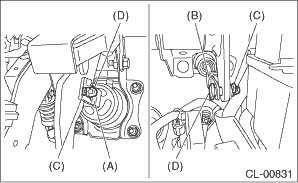
(A) | Operating rod |
(B) | Push rod |
(C) | Snap pin |
(D) | Clevis pin |
7. Remove the clip (A) from the air intake boot.
8. Loosen the clamp (B) connecting the air intake boot and air cleaner case (rear).
9. Loosen the clamp (C) which connects the air intake boot and throttle body.
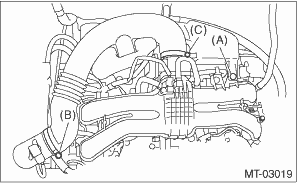
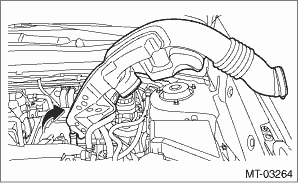
10. Remove the air intake boot from the throttle body, and move it to the left side wheel apron.
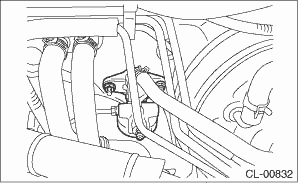
11. Remove the nut which secures the clutch master cylinder.
NOTE:
• Remove the master cylinder from the stud bolt.
• Hold the clutch pipe with a wire or a string to avoid the pipe from bending.
12. Remove the bolts and nuts which secure the brake pedal and clutch pedal, and remove the pedal assembly.
 Adjustment
CLUTCH SYSTEM > Clutch PedalADJUSTMENT1. Turn the lock nut until the full stroke of clutch pedal becomes within the specification.CAUTION:When adjusting the full stroke of clutch pedal, do not turn ...
 Assembly
CLUTCH SYSTEM > Clutch PedalASSEMBLY1. Install the stopper and pedal pad to the clutch pedal.2. Install the clutch switch to the pedal bracket.3. Clean the pedal bushing holes of the clutch pedal a ...
Other materials:
Installation
FRONT SUSPENSION > Front Crossmember Support PlateINSTALLATIONCAUTION:Install so that the front end of the under cover (b) comes inside the bumper face - front (a), and the front end of the mud guard (c) comes outside the bumper face - front (a).Install each part in the reverse order of removal.T ...
Dtc u0327 software incompatibility with vehicle security control module
INSTRUMENTATION/DRIVER INFO (DIAGNOSTICS) > Diagnostic Procedure with Diagnostic Trouble Code (DTC)DTC U0327 SOFTWARE INCOMPATIBILITY WITH VEHICLE SECURITY CONTROL MODULEDetected when CAN data is not received from keyless access CM.NOTE:Perform the diagnosis for LAN system. Basic Diagnostic Proc ...
Starting and stopping the engine (models without push-button start system)
CAUTION
When operating the Subaru Ascent starter motor, never crank the engine continuously
for more than 10 seconds.
If the engine of the Subaru Ascent does not start within 5 to 10 seconds,
stop cranking and wait at least 10 seconds before attempting again. This pause helps
prevent overh ...
