
Subaru Crosstrek Service Manual: Location
LIGHTING SYSTEM > Relay and Fuse
LOCATION
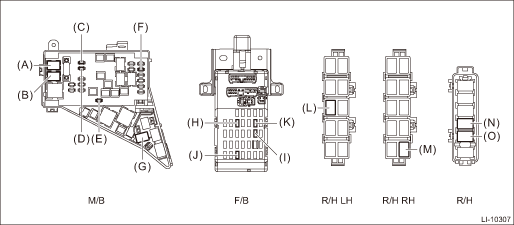
Main fuse box | Headlight relay (HI) | (A) |
Headlight relay (LO) | (B) | |
Fuse 15 A (daytime running light relay) | (C) | |
Fuse 30 A (combination light LH/RH) | (D) | |
Fuse 20 A (spot map light, room light, ignition switch illumination (immobilizer antenna)) | (E) | |
Fuse 15 A (tail and illumination relay, daytime running light relay) | (F) | |
Daytime running light relay | (G) | |
Relay & fuse box | Fuse 10 A (stop light and brake switch, brake relay) | (H) |
Fuse 10A (inhibitor switch, back-up light switch, auto headlight beam leveler CU) | (I) | |
Fuse 15A (front fog light relay*2, front fog light relay LH/RH*1) | (J) | |
Fuse 7.5 A (turn signal & hazard unit) | (K) | |
Relay holder LH (passenger room) | Tail & illumination relay | (L) |
Relay holder RH (passenger room) | Front fog light relay*1 | (M) |
Relay holder (engine compartment) | Front fog light relay RH*2 | (N) |
Front fog light relay LH*2 | (O) |
*1: Model without SRF
*2: Model with SRF
NOTE:
For other related fuses, refer to the wiring diagram. Power Supply Circuit">
 Inspection
LIGHTING SYSTEM > Relay and FuseINSPECTION1. CHECK FUSE1. Remove the fuse and inspect visually.2. If the fuse is blown out, replace the fuse.NOTE:If the fuse is blown again, check the system wiring ...
 Room light
...
Other materials:
Clock/calendar screen setting
1. Perform the preparation steps according
to "Preparation for screen settings"
2. Operate the "
" or "
"
switch to
select the "Clock" item. Then push the
button.
3. Push the
button once more.
4. Select "Analog Clock", "Digital Clock",
"Calendar" or "Off" by operating t ...
Installation
EXTERIOR/INTERIOR TRIM > Rear BumperINSTALLATIONInstall each part in the reverse order of removal.CAUTION:Before installing the bumper face, match the claws on the bracket - rear bumper with the engaging position of flange section on the bumper face side. If the engaging position is not correct, ...
Dtc p0018 crankshaft position - camshaft position correlation bank 2 sensor a
ENGINE (DIAGNOSTICS)(H4DO) > Diagnostic Procedure with Diagnostic Trouble Code (DTC)DTC P0018 CRANKSHAFT POSITION - CAMSHAFT POSITION CORRELATION BANK 2 SENSOR ADTC detecting condition:Detected when two consecutive driving cycles with fault occur.Trouble symptom:• Engine stall• Improp ...
