
Subaru Crosstrek Service Manual: Installation
EXTERIOR/INTERIOR TRIM > Front Bumper
INSTALLATION
1. Install each part in the reverse order of removal.
2. Secure the flange section of the bumper face - front to the bracket - front bumper side.
CAUTION:
• Install so that the front end of the under cover (b) comes inside the bumper face - front (a), and the front end of the mud guard (c) comes outside the bumper face - front (a).
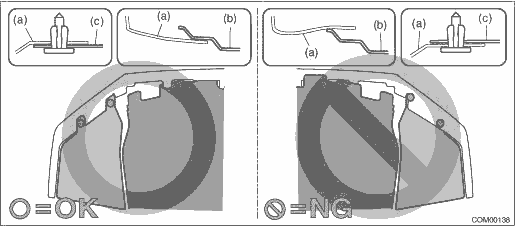
• Before installing the bumper face, match the claws on the bracket - front bumper with the engaging position of flange section on the bumper face side. If the engaging position is not correct, the flange section may be broken or the clearance between fender panel and bumper face may not be uniform.
Tightening torque:
Front bumper-related parts: General Description > COMPONENT">
Under cover - front: 18 N·m (1.84 kgf-m, 13.3 ft-lb)
3. Install each part in the reverse order of removal.
4. Adjust the headlight beam and fog light beam.
• Adjust the headlight beam. Headlight Assembly > ADJUSTMENT">
• Adjust the fog light beam. (Model with fog light) Front Fog Light Assembly > ADJUSTMENT">
 Front bumper
...
 Repair
EXTERIOR/INTERIOR TRIM > Front BumperREPAIR1. COATING METHOD FOR PP BUMPERProcess No.Process nameJob contents1Bumper installationPlace the bumper on a paint worktable as required. Use the paint wor ...
Other materials:
61
CRUISE CONTROL SYSTEM (DIAGNOSTICS) > Diagnostic Procedure with Cancel Code61Malfunction in the stop light & brake switch is detected.TROUBLE SYMPTOM:• Cruise control cannot be set.• Cruise control cannot be released.Refer to DTC 12 for diagnostic procedure. Diagnostic Procedure w ...
Removal
HVAC SYSTEM (HEATER, VENTILATOR AND A/C) > Blower Resistor (Manual A/C Model)REMOVAL1. Disconnect the ground cable from battery. NOTE">2. Remove the glove box. Glove Box > REMOVAL">3. Remove the engine control module (ECM). Engine Control Module (ECM) > REMOVAL">4 ...
Removal
COOLING(H4DO) > Water Pipe AssemblyREMOVAL1. WATER PIPE ASSEMBLY RH1. Disconnect the ground cable from battery. NOTE">2. Drain engine coolant. Engine Coolant > REPLACEMENT">3. Remove the front exhaust pipe. Front Exhaust Pipe > REMOVAL">4. Disconnect the water hos ...
