
Subaru Crosstrek Service Manual: Installation
COOLING(H4DO) > Radiator
INSTALLATION
1. Attach the radiator lower cushion to the radiator lower bracket.
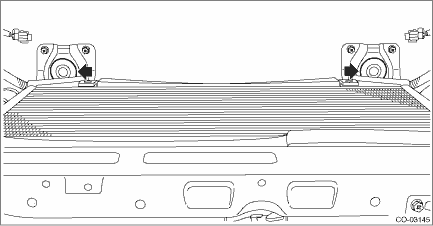
2. Install the radiator to vehicle.
NOTE:
Make pins on the lower side of radiator be fitted into the radiator lower cushions.
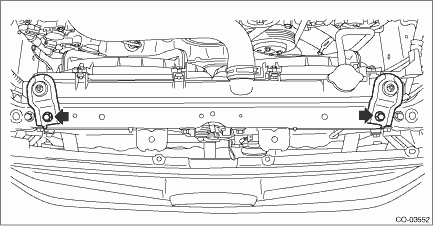
3. Install the radiator upper brackets.
Tightening torque:
12 N·m (1.2 kgf-m, 8.9 ft-lb)
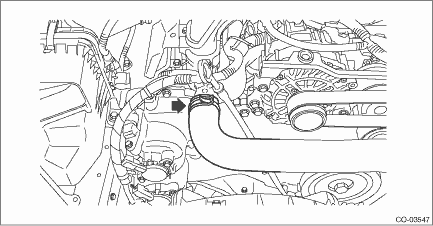
4. Connect the radiator inlet hose to the water pipe assembly.
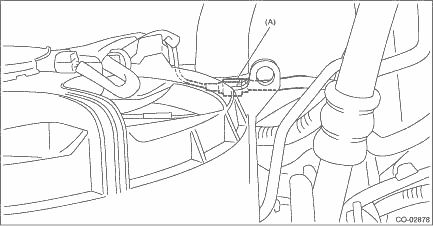
5. Connect the connector (A) to the main fan motor assembly and the connector (B) to the sub fan motor assembly.
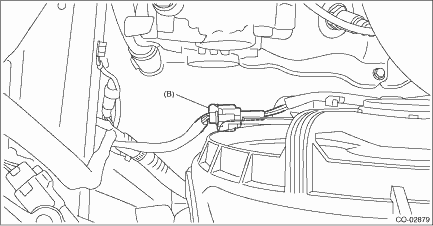
6. Install the reservoir tank. Reservoir Tank > INSTALLATION">
7. Install the air intake duct. Air Intake Duct > INSTALLATION">
8. Lift up the vehicle.
9. Connect the radiator outlet hose to thermostat cover.
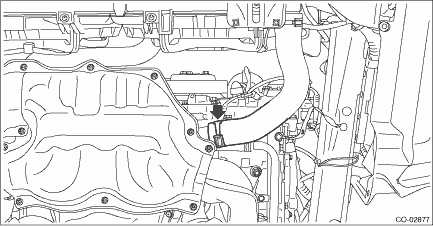
10. Install the under cover. Front Under Cover > INSTALLATION">
11. Lower the vehicle.
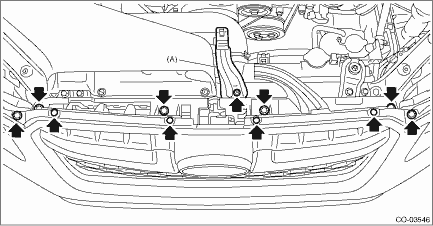
12. Attach the bracket - plate (A).
Tightening torque:
7.5 N·m (0.8 kgf-m, 5.5 ft-lb)
13. Attach the grille bracket.
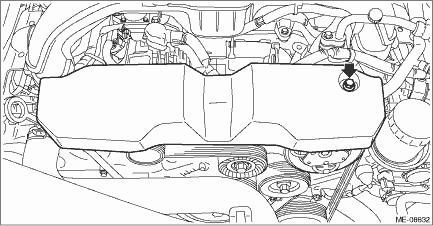
14. Install the V-belt cover.
Tightening torque:
7 N·m (0.7 kgf-m, 5.2 ft-lb)
15. Connect the battery ground terminal. NOTE">
16. Fill engine coolant. Engine Coolant > REPLACEMENT">
 Removal
COOLING(H4DO) > RadiatorREMOVALCAUTION:The radiator is pressurized when the engine and radiator are hot. Wait until engine and radiator cool down before working on the radiator.1. Disconnect the gr ...

Other materials:
Dtc p0717 input/turbine shaft speed sensor "a" circuit no signal
CONTINUOUSLY VARIABLE TRANSMISSION (DIAGNOSTICS) > Diagnostic Procedure with Diagnostic Trouble Code (DTC)DTC P0717 INPUT/TURBINE SHAFT SPEED SENSOR "A" CIRCUIT NO SIGNALDTC detecting condition:Immediately at fault recognitionTrouble symptom:• Standing start problems• Shock ...
Electronic Brake Force Distribution (EBD) system
The Electronic Brake Force Distribution (EBD) system in the Subaru Ascent enhances
braking efficiency by dynamically adjusting the distribution of braking force between
the front and rear wheels. This optimization depends on factors such as vehicle
load, speed, and driving conditions, ensuring ...
Inspection
LIGHTING SYSTEM > Headlight SystemINSPECTION1. AUTO HEADLIGHT SYSTEM CHECKSTEPCHECKYESNO1.CHECK HEADLIGHT ILLUMINATION.Set the lighting switch to the switch 1 (TAIL/PARKING) and switch 2 (HEAD).Do the tail and headlight illuminate? Headlight System > INSPECTION">Go to Step 2.Check the ...
