
Subaru Crosstrek Service Manual: Installation
INTAKE (INDUCTION)(H4DO) > Air Cleaner Case
INSTALLATION
1. Install the bolt (A) and nut (B) which secure the air cleaner case (front) to the body.
Tightening torque:
Bolt (A)
6 N·m (0.6 kgf-m, 4.4 ft-lb)
Nut (B)
7.5 N·m (0.8 kgf-m, 5.5 ft-lb)
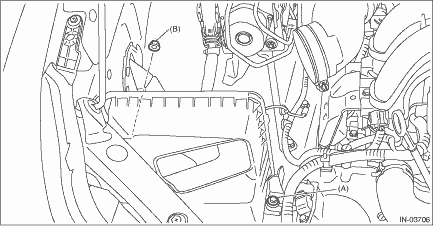
2. Install the air cleaner case (rear) and air cleaner element.
NOTE:
• Check that there is no dirt or dust within the air cleaner case. If any dirt or dust is found, clean it.
• Install the air cleaner element as shown in the figure.
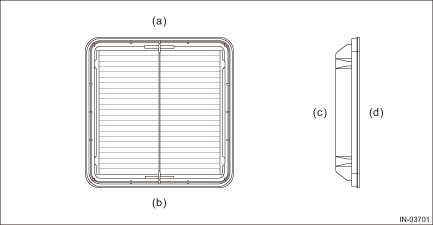
(a) | Upside | (b) | Downside | (c) | Air cleaner case (front) side |
(d) | Air cleaner case (rear) side |
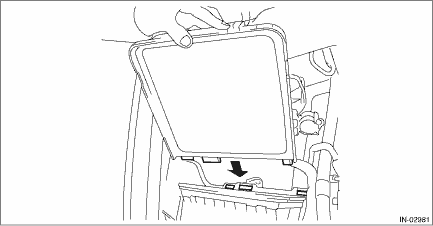
• When installing the air cleaner case (rear), align the protrusion of the air cleaner case (rear) to the hole on the air cleaner case (front) to install.
3. Install the clips (B) to the air cleaner case (front), then tighten the clamp (A) that secures the air intake boot to the air cleaner case (rear).
Tightening torque:
Clamp (A)
3 N·m (0.3 kgf-m, 2.2 ft-lb)
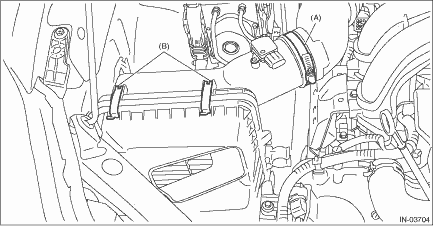
4. Connect the connector (A) to the mass air flow and intake air temperature sensor and secure the harness with clip (B).
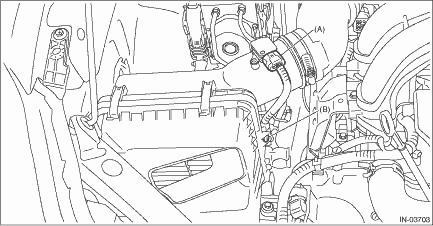
5. Install the air intake duct. Air Intake Duct > INSTALLATION">
6. Connect the battery ground terminal. NOTE">
 Removal
INTAKE (INDUCTION)(H4DO) > Air Cleaner CaseREMOVAL1. Disconnect the ground cable from battery. NOTE">2. Remove the air intake duct. Air Intake Duct > REMOVAL">3. Disconnect the ...

Other materials:
To help prevent corrosion
Wash the vehicle regularly to prevent
corrosion of the body and suspension
components. Also, wash the vehicle
promptly after driving on any of the
following surfaces.
roads that have been salted to prevent
them from freezing in winter
mud, sand, or gravel
coastal roads
After the win ...
Removal
FUEL INJECTION (FUEL SYSTEMS)(H4DO) > Main RelayREMOVAL1. Disconnect the ground cable from battery.2. Remove the glove box. Glove Box > REMOVAL">3. Remove the main relay from relay block. ...
iPod
Audio files on the iPod can be played.
WARNING
Do not operate the player's controls
or connect the iPod while driving.
Doing so may result in loss of
control of your vehicle and cause
an accident or serious injury.
CAUTION
Do not leave your portable player
in the car. In particular, h ...
