
Subaru Crosstrek Service Manual: Inspection
TIRE PRESSURE MONITORING SYSTEM (DIAGNOSTICS) > Tire Pressure Warning Light / Trouble Indicator Light Illumination Pattern
INSPECTION
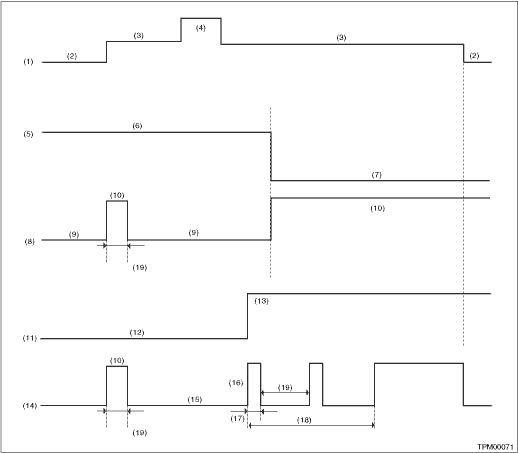
(1) | Ignition switch | (8) | Tire inflation pressure warning light (pressure condition) | (15) | Light OFF |
(2) | OFF | (9) | Light OFF | (16) | Blink |
(3) | ON | (10) | Light ON | (17) | 1 second |
(4) | Start | (11) | System status | (18) | Blinks 25 times |
(5) | Tire inflation pressure condition | (12) | Normal | (19) | 2 seconds |
(6) | Meet the specification | (13) | Malfunction | ||
(7) | Less than standard value (For the pressure warning level, refer to “CURRENT DATA”.) Read Current Data > LIST"> | (14) | Tire inflation pressure warning light (system condition) |
1. When the tire pressure warning light does not illuminate in accordance with this illumination pattern, there must be an electrical malfunction.
2. If the tire pressure warning light does not go off, check the TPMS & keyless entry CM or TPMS CM/warning light circuit and the combination meter circuit. Tire Pressure Warning Light / Trouble Indicator Light Illumination Pattern > TIRE PRESSURE WARNING LIGHT DOES NOT COME OFF">
NOTE:
If the problem is fixed while driving at approximately 40 km/h (25 MPH) after the tire pressure warning light blinks/lights, the warning light goes out and the tire pressure monitor system operates normally. (If there is a decrease in tire pressure, or a malfunction of the system, the malfunction history is displayed.)

 Tire pressure warning light is 25 times blinking and turn on
TIRE PRESSURE MONITORING SYSTEM (DIAGNOSTICS) > Tire Pressure Warning Light / Trouble Indicator Light Illumination PatternTIRE PRESSURE WARNING LIGHT IS 25 TIMES BLINKING AND TURN ONDetecting condi ...
Other materials:
Selection of manual mode
In the Subaru Ascent, manual mode allows the driver to take direct control over
gear selection for a more engaging and responsive driving experience. Whether the
vehicle is stationary or in motion, you can activate this mode by moving the select
lever from the "D" (Drive) positio ...
License plate light
1. The license plate light must be pushed
inwards, then pulled out to be removed.
2. Turn the bulb socket counterclockwise
and pull out the socket.
3. Pull the bulb out of the socket.
4. Install a new bulb.
5. Reinstall the bulb socket and the
license plate light cover. ...
Removal
HVAC SYSTEM (HEATER, VENTILATOR AND A/C) > Control PanelREMOVALCAUTION:Before handling the airbag system components, refer to “CAUTION” of “General Description” in “AIRBAG SYSTEM”. General Description > CAUTION">1. Disconnect the ground cable from b ...
