
Subaru Crosstrek Service Manual: Inspection
LIGHTING SYSTEM > Light Control Sensor
INSPECTION
1. Turn the ignition switch to ON.
2. Set the lighting switch to AUTO position.
3. Check the voltage between the sensor terminals.
Preparation tool:
Circuit tester
Terminal No. | Inspection conditions | Standard | Connection diagram |
2 (+) — 1 (−) | Measure the voltage when the area around the sensor - automatic light, which was dark, becomes bright. | Dark condition: Approx. 0.6 V or less |
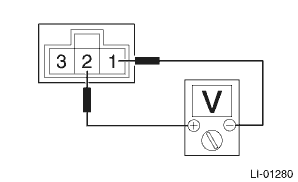
Bright condition: Approx. 3.0 V or more
4. Replace the sensor - automatic light if the inspection result is not within the standard value.

 Removal
LIGHTING SYSTEM > Light Control SensorREMOVAL1. Disconnect the ground cable from battery. NOTE">2. Remove the sensor - automatic light.CAUTION:Be careful not to damage the sensors and inte ...
Other materials:
Reporting safety defects (U.S.A.)
If you believe that your vehicle has
a defect which could cause a
crash or could cause injury or
death, you should immediately inform
the National Highway Traffic
Safety Administration (NHTSA) in
addition to notifying Subaru of
America, Inc.
If NHTSA receives similar complaints,
it may op ...
Dtc p0705 transmission range sensor "a" circuit (prndl input)
CONTINUOUSLY VARIABLE TRANSMISSION (DIAGNOSTICS) > Diagnostic Procedure with Diagnostic Trouble Code (DTC)DTC P0705 TRANSMISSION RANGE SENSOR "A" CIRCUIT (PRNDL INPUT)DTC detecting condition:Immediately at fault recognitionTrouble symptom:• Shift characteristics are erroneous.&bul ...
Dtc b28a2 eyesight communication(vdc)
EyeSight (DIAGNOSTICS) > Diagnostic Procedure with Diagnostic Trouble Code (DTC)DTC B28A2 EyeSight COMMUNICATION(VDC)Detected when the VDC control module (VDCCM) detects the malfunction of stereo camera.DTC DETECTING CONDITION:• Defective CAN system• Defective VDC control module (VDCC ...
