
Subaru Crosstrek Service Manual: Inspection
INSTRUMENTATION/DRIVER INFO (DIAGNOSTICS) > Subaru Select Monitor
INSPECTION
1. COMMUNICATION FOR INITIALIZING IMPOSSIBLE (COMBINATION METER)
Detecting condition:
• Defective harness connector
• Power supply circuit malfunction
• Defective combination meter
• Defective CAN communication circuit
• Defective Subaru Select Monitor
Trouble symptom:
Communication is impossible between combination meter and Subaru Select Monitor.
Wiring diagram:
• Combination meter system Combination Meter System > WIRING DIAGRAM">
• CAN communication system CAN Communication System > WIRING DIAGRAM">
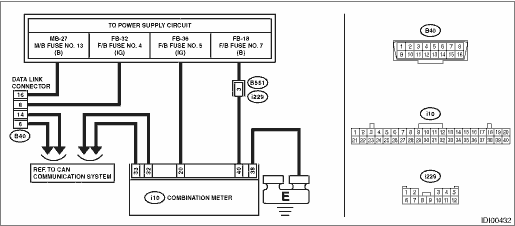
| STEP | CHECK | YES | NO |
1.CHECK OTHER COMMUNICATION.
Communicate with the system other than the combination meter using the Subaru Select Monitor.
Is the communication to other control module possible?
Subaru Select Monitor > INSPECTION">Go to Step 2.
Perform the “Communication for Initializing Impossible” of LAN system. Subaru Select Monitor > COMMUNICATION FOR INITIALIZING IMPOSSIBLE">
2.CHECK DTC.
Read the DTC of the LAN system using the Subaru Select Monitor. Read Diagnostic Trouble Code (DTC) > OPERATION">
Is DTC detected?
Perform the diagnosis according to DTC.
Subaru Select Monitor > INSPECTION">Go to Step 3.
3.CHECK COMBINATION METER.
1) Turn the ignition switch to OFF.
2) Disconnect the connector of combination meter.
3) Connect the disconnected connectors.
4) Communicate with the combination meter using the Subaru Select Monitor.
Is communication possible?
It is possible that temporary poor communication occurs.
Replace the combination meter. Combination Meter">
2. COMMUNICATION FOR INITIALIZING IMPOSSIBLE (MFD)
Detecting condition:
• Defective harness connector
• Power supply circuit malfunction
• Defective MFD
• Defective CAN communication circuit
• Defective Subaru Select Monitor
Trouble symptom:
Communication is impossible between MFD and Subaru Select Monitor.
Wiring diagram:
• Multi-function display (MFD) system Multi-function Display (MFD) System > WIRING DIAGRAM">
• CAN communication system CAN Communication System > WIRING DIAGRAM">
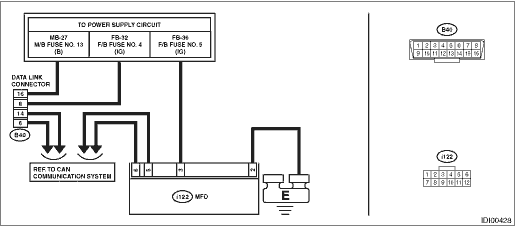
| STEP | CHECK | YES | NO |
1.CHECK OTHER COMMUNICATION.
Communicate with the system other than the MFD using the Subaru Select Monitor.
Is the communication to other control module possible?
Subaru Select Monitor > INSPECTION">Go to Step 2.
Perform the “Communication for Initializing Impossible” of LAN system. Subaru Select Monitor > COMMUNICATION FOR INITIALIZING IMPOSSIBLE">
2.CHECK DTC.
Read the DTC of the LAN system using the Subaru Select Monitor. Read Diagnostic Trouble Code (DTC) > OPERATION">
Is DTC detected?
Perform the diagnosis according to DTC.
Subaru Select Monitor > INSPECTION">Go to Step 3.
3.CHECK MFD.
1) Turn the ignition switch to OFF.
2) Disconnect the MFD connector.
3) Connect the disconnected connectors.
4) Communicate with the MFD using the Subaru Select Monitor.
Is communication possible?
It is possible that temporary poor communication occurs.
Replace the MFD. Multi-function Display (MFD)">

 Operation
INSTRUMENTATION/DRIVER INFO (DIAGNOSTICS) > Subaru Select MonitorOPERATION• For detailed operation procedures, refer to “Application help”.• If the combination meter or MFD ...
Other materials:
Dtc b1577 imm control module eeprom
KEYLESS ACCESS WITH PUSH BUTTON START SYSTEM (DIAGNOSTICS) > Diagnostic Procedure with Diagnostic Trouble Code (DTC)DTC B1577 IMM CONTROL MODULE EEPROM1. EXCEPT FOR C0 AND C5 MODELSDTC detecting condition:• Defective keyless access CM• When inaccessible to ROM in keyless access CM.STE ...
Preparation tool
STARTING/CHARGING SYSTEMS(H4DO) > General DescriptionPREPARATION TOOL1. GENERAL TOOLTOOL NAMEREMARKSCircuit testerUsed for measuring resistance, voltage and current.NOTE:• For measuring standby current, prepare a circuit tester that can measure by 1 mA unit.• For measuring standby cur ...
Dtc c1311 fr hold valve
VEHICLE DYNAMICS CONTROL (VDC) (DIAGNOSTICS) > Diagnostic Procedure with Diagnostic Trouble Code (DTC)DTC C1311 FR HOLD VALVENOTE:For the diagnostic procedure, refer to “DTC C1362 NORMAL CLOSING VALVE 2”. Diagnostic Procedure with Diagnostic Trouble Code (DTC) > DTC C1362 NORMAL C ...
