
Subaru Crosstrek Service Manual: Inspection
GLASS/WINDOWS/MIRRORS > Outer Mirror Assembly
INSPECTION
1. CHECK OPERATION
1. Disconnect the outer mirror connector.
2. Apply battery voltage between the outer mirror connector terminals and check the mirror operation.
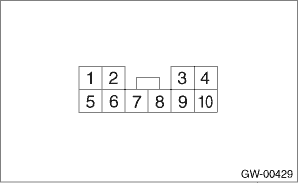
Terminal No. | Inspection conditions | Switch position |
— | — | OFF |
3 (+) — 8 (−) | Apply battery voltage between terminals. | UP |
8 (+) — 3 (−) | Apply battery voltage between terminals. | DOWN |
7 (+) — 3 (−) | Apply battery voltage between terminals. | LEFT |
3 (+) — 7 (−) | Apply battery voltage between terminals. | RIGHT |
3. If it does not operate normally, replace the outer mirror assembly.
2. CHECK OPERATION OF Subaru Rear Vehicle Detection INDICATOR
1. Check the Subaru Rear Vehicle Detection system. Basic Diagnostic Procedure">
2. Check the outer mirror assembly.
(1) Check that it illuminates normally when the BSD/RCTA OFF switch is turned ON while it is installed to the vehicle.
(2) If it does not illuminate normally, replace the mirror - repair.
(3) Check that it illuminates normally again. If it does not illuminate normally, replace the outer mirror assembly.
 Disassembly
GLASS/WINDOWS/MIRRORS > Outer Mirror AssemblyDISASSEMBLYCAUTION:When removing the mirror - repair, be careful not to damage the back surface of mirror - repair with a flat tip screwdriver.1. Operat ...
 Installation
GLASS/WINDOWS/MIRRORS > Outer Mirror AssemblyINSTALLATIONCAUTION:Be careful not to catch the harness in between the parts.Install each part in the reverse order of removal.Tightening torque:Outer m ...
Other materials:
Disassembly
STARTING/CHARGING SYSTEMS(H4DO) > StarterDISASSEMBLYCAUTION:The starter should be placed through a no-load test whenever it has been overhauled.1. Disconnect the cable from the magnet switch assembly.2. Remove the magnet switch assembly from the starter housing assembly.3. Remove screws (A) of th ...
Stowage of the cargo area cover
The cargo area cover can be stowed in
under the cargo floor.
1. Raise and fold the rear end of the
cargo floor board.
2. Stow the cover housing in the cargo
area end.
3. Put the cargo floor board back while
hanging two retaining straps on the hooks
that are located on the rear wa ...
Front passenger's seatbelt
The front passenger's seatbelt has
shoulder belt and lap belt pretensioner.
Seatbelt retractor assembly (shoulder
belt pretensioner)
Lap belt pretensioner
On the front passenger's side, the
shoulder belt pretensioner is supplemented
by a lap belt pretensioner, which is
located at ...
