
Subaru Crosstrek Service Manual: Inspection
FUEL INJECTION (FUEL SYSTEMS)(H4DO) > Manifold Absolute Pressure Sensor
INSPECTION
1. Check that the manifold absolute pressure sensor has no deformation, cracks or other damages.
2. Connect dry-cell battery positive terminal to terminal No. 3 and dry-cell battery ground terminal to terminal No. 1, circuit tester positive terminal to terminal No. 2 and the circuit tester ground terminal to terminal No. 1.
NOTE:
• Use new dry-cell batteries.
• Using a circuit tester, check that the initial voltage of each dry-cell battery is 1.6 V or more. And also check that the voltage of three batteries in series is between 4.8 V and 5.2 V.
• For power supply, 5 V DC constant voltage power source can also be used.
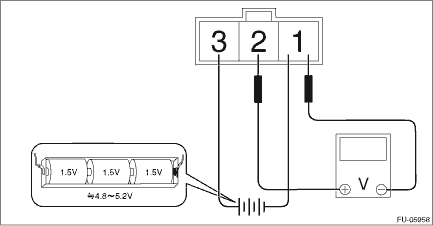
3. Check the voltage at a normal atmospheric pressure.
NOTE:
The atmospheric pressure at higher altitude is lower than normal. Therefore, the voltage is lower than the standard value.
Terminal No. | Standard |
2 (+) and 1 (−) | Approx. 4.2 V (when 25°C (77°F)) |
4. Connect the Mighty Vac to the pressure port (A) of manifold absolute pressure sensor.
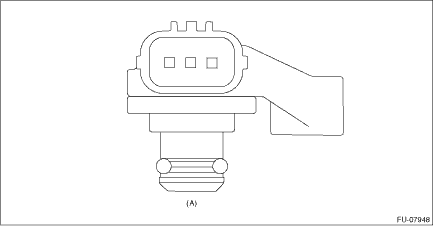
5. Check the voltage when generating vacuum using Mighty Vac.
CAUTION:
Do not apply vacuum of less than −88 kPa (−0.9 kg/cm2, −12.8 psi). Doing so may damage the manifold absolute pressure sensor.
NOTE:
When vacuum occurs at the pressure port of manifold absolute pressure sensor, the voltage will drop from the value as in step 3).
Pressure | Terminal No. | Standard |
−88 kPa (−0.9 kg/cm2, −12.8 psi) | 2 (+) and 1 (−) | Approx. 1 V (when 25°C (77°F)) |

 Removal
FUEL INJECTION (FUEL SYSTEMS)(H4DO) > Manifold Absolute Pressure SensorREMOVAL1. Disconnect the ground cable from battery.2. Disconnect the connector (A) from the manifold absolute pressure sensor, ...
Other materials:
Dtc u0101 lost communication with tcm
INSTRUMENTATION/DRIVER INFO (DIAGNOSTICS) > Diagnostic Procedure with Diagnostic Trouble Code (DTC)DTC U0101 LOST COMMUNICATION WITH TCMDetected when CAN data from TCM does not arrive.NOTE:Perform the diagnosis for LAN system. Basic Diagnostic Procedure > PROCEDURE"> ...
Rear windows side seating position
Head restraint
Release button
To remove:
While pressing the release button, pull out
the head restraint.
To install:
Install the head restraint into the holes that
are located on the top of the seatback until
the head restraint locks. Press and hold
the release button to lower t ...
General diagnostic table Inspection
ENGINE (DIAGNOSTICS)(H4DO) > General Diagnostic TableINSPECTION1. ENGINENOTE:Malfunction of parts other than those listed is also possible. Engine Trouble in General">SymptomsFaulty parts1. Engine stalls during idling.1) Manifold absolute pressure sensor2) Mass air flow and intake air te ...
