
Subaru Crosstrek Service Manual: Inspection
EyeSight > Switches and Harness
INSPECTION
1. PRE-COLLISION BRAKE OFF SWITCH AND LANE DEPARTURE WARNING OFF SWITCH
1. Measure the resistance between connector terminals.
Preparation tool:
Circuit tester
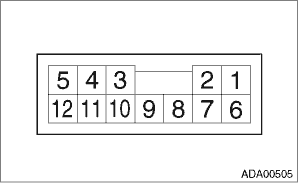
• Pre-collision brake OFF switch
Terminal No. | Inspection conditions | Standard |
10 — 8 | OFF | Approx. 1 k? |
ON | Less than 1 ? |
• Lane departure warning OFF switch
Terminal No. | Inspection conditions | Standard |
9 — 8 | OFF | Approx. 1 k? |
ON | Less than 1 ? |
2. Apply battery voltage between the connector terminals to check lighting condition of illumination inside the switch.
Terminal No. | Inspection conditions | Specification |
1 (+) — 2 (−) | Apply battery voltage. | Light ON |
3. Replace the stereo camera cover assembly if faulty is found in the inspection.
2. EyeSight STEERING SWITCH
1. Measure the resistance between connector terminals.
Preparation tool:
Circuit tester
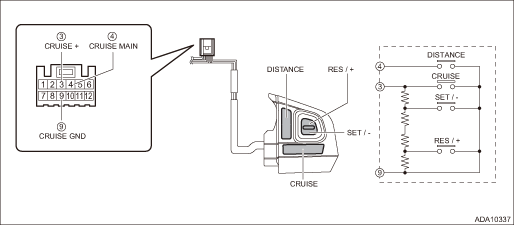
Terminal No. | Inspection conditions | Standard | |
3 — 9 | CRUISE (MAIN) SET/− RES/+ | All OFF | Approx. 4,020 ? |
CRUISE (MAIN) | ON | Less than 1 ? | |
SET/− | ON | Approx. 250 ? | |
RES/+ | ON | Approx. 1,470 ? | |
4 — 9 | DISTANCE | OFF | 1 M? or more |
ON | Less than 1 ? | ||
2. Apply battery voltage between the connector terminals to check lighting condition of illumination inside the switch.
Terminal No. | Inspection conditions | Specification |
10 (+) — 11 (−) | Apply battery voltage. | Light ON |
3. Replace the EyeSight steering switch if it is found defective.

 Note
Note
EyeSight > Switches and HarnessNOTE1. PRE-COLLISION BRAKE OFF SWITCH & LANE DEPARTURE WARNING OFF SWITCHThe pre-collision brake OFF & lane departure warning OFF switch is integrated in the ...
Other materials:
Selection of manual mode
With the vehicle either moving or stationary,
move the select lever from the "D"
position to the "M" position to select the
manual mode.
Type A
Upshift indicator
Downshift indicator
Gear position indicator
Type B
Upshift indicator
Downshift indicator
Gear position indi ...
Dtc c1424 ecm
VEHICLE DYNAMICS CONTROL (VDC) (DIAGNOSTICS) > Diagnostic Procedure with Diagnostic Trouble Code (DTC)DTC C1424 ECMDTC detecting condition:ECM malfunctioningTrouble symptom:• ABS does not operate.• VDC does not operate.• Hill start assist does not operate.STEPCHECKYESNO1.CHECK E ...
Relay and fuse
Inspection
Blind Spot Detection/Rear Cross Traffic Alert > Relay and FuseINSPECTION1. CHECK FUSE1. Remove the fuse and inspect visually.2. If the fuse is blown out, replace the fuse.NOTE:If the fuse is blown again, check the system wiring harness. Location
Blind Spot Detection/Rear Cross Traffi ...
