
Subaru Ascent 2018-2026 Owner's Manual: HomeLink Wireless Control System
The HomeLink Wireless Control System in the Subaru Ascent offers a highly convenient and integrated solution for replacing up to three separate hand-held radio-frequency remotes. This advanced system allows drivers to control various devices such as garage door openers, automatic gates, entry locks, security systems, and even home lighting directly from inside the Subaru Ascent. The following instructions outline the general programming procedure; however, for specific devices such as Genie or Sommer garage door openers, it is recommended to consult the official HomeLink website for detailed guidance.
For additional resources, including step-by-step tutorials and visual programming demonstrations, visit www.HomeLink.com/Subaru and www.youtube.com/HomeLinkGentex to ensure proper configuration and optimal use of the HomeLink system in your Subaru Ascent.
CAUTION
- Before programming the HomeLink system in the Subaru Ascent, always ensure that the area around the device being controlled is clear of people, pets, and objects to prevent injury or damage.
- When setting up a garage door opener, it is safest to park the Subaru Ascent outside the garage to maintain a clear and controlled environment.
- Do not attempt to use the HomeLink system with garage door openers that lack required safety stop and reverse mechanisms. Devices manufactured before April 1, 1982 may not comply with current safety standards and should not be used.
- For improved programming accuracy and faster signal transmission, it is recommended to install a fresh battery in the handheld remote before beginning the setup process.
- Depending on the configuration of the Subaru Ascent, the ignition switch may need to be set to the "ON" or "ACC" position during programming or operation of HomeLink.
- Keep the original handheld remote available for use with other vehicles
or for future programming needs.
For security reasons, it is advisable to erase all programmed HomeLink buttons when transferring ownership of the Subaru Ascent to another user.
HomeLink set up
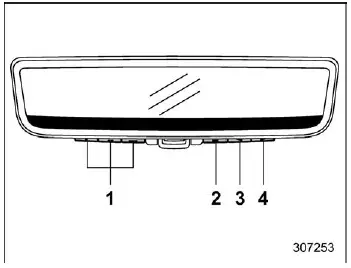
- HomeLink buttons
- Left button
- Center button
- Right button
To begin configuring the HomeLink system in your Subaru Ascent, press any of the control buttons (left, center, or right) to access the main menu. Navigate to the HomeLink section using the left button or simply press one of the dedicated HomeLink buttons to open the setup interface.
NOTE
The main menu can only be accessed when the Subaru Ascent is in the "P" (Park) position, ensuring safe interaction with system settings.
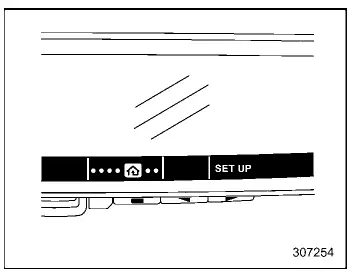
1. Select "SET UP" using the right button.
2. Confirm your selection by choosing "Continue" with the HomeLink left button.
3. Press any of the available HomeLink buttons to begin assigning a function.
4. Carefully read the on-screen instructions displayed in the Subaru Ascent and proceed by selecting "Continue".
5. Position the handheld remote (such as a garage door opener) approximately 2 inches (5 cm) from the mirror assembly.
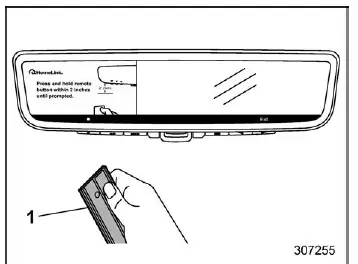
- Garage door opener remote
6. While the programming instructions are active on the display, press and hold the button on your handheld remote until the Subaru Ascent system detects the signal.
NOTE
Some remotes may perform better when positioned slightly farther away, typically between 6 and 12 inches (15 to 30 cm). Adjust the distance if the programming process does not complete successfully on the first attempt.
7. Ensure that the garage door or connected device is not in motion, then confirm by selecting "OK" on the display.
8. Firmly press the HomeLink left button three times to finalize synchronization.
At this stage, the programmed device should respond when the corresponding HomeLink button is pressed in the Subaru Ascent.
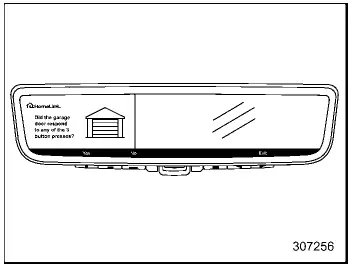
9. "Program Success": If the connected device responds correctly, select "Yes" to complete the process.
If the device does not respond, select "No" and continue with additional steps to complete programming.
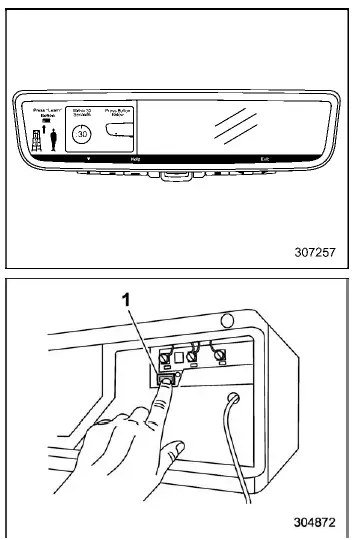
- "Learn" button
The HomeLink system in the Subaru Ascent provides seamless integration between your vehicle and home automation devices, simplifying daily routines while maintaining high levels of safety and convenience through intuitive controls and reliable wireless communication.
10. When completing the HomeLink setup in your Subaru Ascent, locate the "Learn", "Smart", or "Program" button on the garage door opener motor or gate control unit. This button is typically positioned near the antenna wire attached to the motor housing. Depending on the manufacturer, its label and color may differ, so consulting the device manual can help identify it correctly.
In most Subaru Ascent setups, this step is essential for synchronizing the vehicle’s HomeLink system with the external device.
NOTE
Using a ladder or having an assistant nearby can significantly simplify access to the garage motor unit, especially if it is mounted at height.
11. Press and release the identified "Learn", "Smart", or "Program" button. After doing so, you will have approximately 30 seconds to return to your Subaru Ascent and complete the next step.
12. Return promptly to the Subaru Ascent and press the HomeLink left button to initiate communication with the device.
13. Firmly press the HomeLink left button three times to complete synchronization between the Subaru Ascent and the garage system.
At this stage, the programmed device should respond immediately when the HomeLink button is pressed and released, confirming successful integration.
14. "Program Success": If the device operates correctly, select "Yes" on the display to confirm completion of the programming process.
If programming challenges persist or further clarification is needed, detailed support materials, instructional videos, and troubleshooting guides are available at www.HomeLink.com/Subaru and www.youtube.com/HomeLinkGentex. For specific brands such as Genie or Sommer, refer directly to the HomeLink website for tailored instructions.
Gate Operator/Canadian Programming
In certain regions, including Canada, radio-frequency regulations limit the duration of remote signal transmission. As a result, some remotes automatically stop transmitting after a few seconds, which may not be sufficient for the Subaru Ascent HomeLink system to capture the signal during programming. Similar behavior may also occur with certain gate operators in the United States.
When the handheld remote completes its transmission cycle, its indicator LED will turn off, signaling that the transmission has ended.
If you encounter programming difficulties in your Subaru Ascent due to this limitation, modify the standard procedure by repeatedly pressing and releasing the handheld remote button every two seconds while the HomeLink indicator is flashing orange. Continue this cycling process until the indicator changes to green, confirming that the signal has been successfully learned.
NOTE
To prevent overheating or unintended operation, it is advisable to temporarily disconnect the garage door opener or gate motor during this repeated transmission process.
Once completed, proceed with the next standard programming step to finalize setup in your Subaru Ascent.
Using HomeLink
Operating the HomeLink system in the Subaru Ascent is simple and intuitive. Press and release the programmed HomeLink button to activate the linked device instantly.
This allows seamless control of systems such as garage doors, security gates, entry locks, and lighting. The original handheld remote can still be used if needed, offering additional flexibility.
Erasing HomeLink Buttons
1. Access the main menu in your Subaru Ascent by pressing any of the control buttons (left, center, or right).
Select the HomeLink menu using the left control.
2. Choose "SET UP" using the right button.
3. Confirm by selecting "Continue" with the HomeLink left button.
4. Select the trash icon using the HomeLink left button to initiate the erase process.
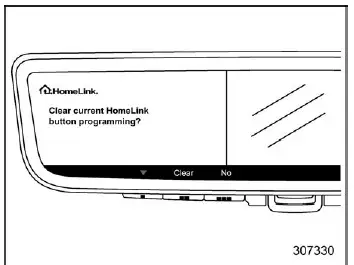
5. Confirm deletion by selecting "Clear" using the HomeLink center button.
After clearing, the HomeLink system in the Subaru Ascent is reset and ready for new programming at any time.
Reprogramming a Single HomeLink Button
To reassign a previously programmed HomeLink button in the Subaru Ascent, follow the same steps outlined in the HomeLink setup procedure to overwrite the existing configuration.
Garage Door Two-Way Communication
The Subaru Ascent HomeLink system supports advanced two-way communication with compatible garage door openers, allowing real-time feedback on door status.
The system can display whether the garage door is opening or closing and can also recall the last known status, indicating whether the door is currently open or closed.
This communication can be received at distances of up to approximately 820 feet (250 meters), depending on environmental conditions.
However, signal range may be reduced by obstacles such as buildings, trees, or other structures. In such cases, slowing down the Subaru Ascent while approaching your garage can improve signal reception and ensure reliable communication.
The HomeLink system in the Subaru Ascent enhances everyday convenience by integrating vehicle controls with home automation, offering a seamless and efficient user experience when interacting with garage systems and other connected devices.
Programming Two-Way Communication
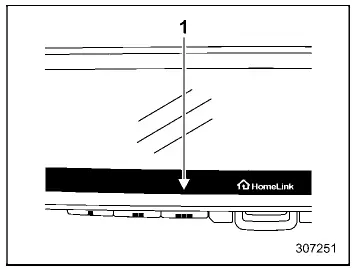
- Status Indicators
In the Subaru Ascent, once a new HomeLink button has been successfully programmed, the system automatically attempts to establish two-way communication with a compatible garage door opener. Within approximately five seconds, both status indicators will begin flashing rapidly in green, confirming that this advanced communication feature has been activated.
If the indicators do not flash in your Subaru Ascent, it may indicate that the connected device does not support two-way communication or that additional setup is required. In such cases, detailed guidance and instructional videos can be accessed at www.HomeLink.com/Subaru and www.youtube.com/HomeLinkGentex.
Using Two-Way Communication
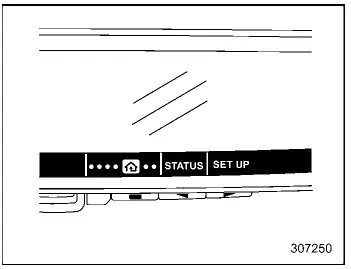
To access the two-way communication status in the Subaru Ascent, press any of the control buttons (left, center, or right) to open the main menu. Then navigate to the HomeLink menu using the left button.
Select the "STATUS" option using the center button to retrieve the most recent communication data from your connected device.
NOTE
The Subaru Ascent system restricts access to the main menu unless the transmission is set to the "P" (Park) position, ensuring safe operation during configuration.
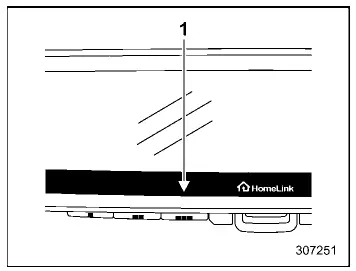
- Status Indicators
The Subaru Ascent allows you to recall and display the most recent garage door status message at any time. Once selected, the system will show the last recorded status for approximately five seconds, providing quick confirmation of whether your garage door is open or closed.
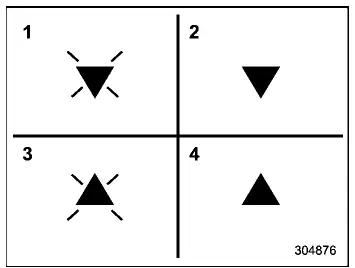
- Garage Door Opener CLOSING (Blinking Orange)
- Garage Door Opener CLOSED (Solid Green)
- Garage Door Opener OPENING (Blinking Orange)
- Garage Door Opener OPENED (Solid Green)
When two-way communication is properly configured in the Subaru Ascent, the system uses intuitive arrow indicators and color signals to display real-time garage door activity, enhancing both convenience and situational awareness for the driver.
Certification
If you encounter persistent programming issues or require further assistance with the HomeLink system in your Subaru Ascent, additional support resources, including step-by-step tutorials and video guides, are available at www.HomeLink.com/Subaru and www.youtube.com/HomeLinkGentex. You can also contact the HomeLink support hotline at 1-800-355-3515 for direct assistance.
- U.S.-spec. models
CAUTION
FCC WARNING
Any modifications or changes not expressly approved by the responsible compliance authority may invalidate your right to operate the HomeLink system in the Subaru Ascent.
HomeLink and the HomeLink house symbol are registered trademarks of Gentex Corporation and are widely used in advanced vehicle systems such as those found in the Subaru Ascent.
WARNING
- While programming the HomeLink Wireless Control System in the Subaru Ascent, you may unintentionally activate a garage door or similar device. Always ensure that the area is clear of people, pets, and obstacles before initiating programming.
- Do not operate the HomeLink system with garage door openers that do not include mandatory safety stop and reverse features. Using non-compliant systems significantly increases the risk of injury or property damage. For more information, visit www.HomeLink.com/Subaru or contact support directly.
Language
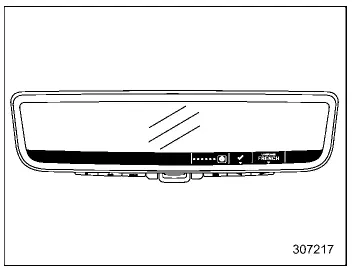
The Subaru Ascent Smart Rearview Mirror interface allows you to customize the display language for improved usability and driver comfort.
1. Press any of the control buttons (left, center, or right) to access the main menu.
Select the "LANGUAGE" option using the left button.
2. Choose your preferred language using the right button, then confirm the selection by pressing the center button.
NOTE
As with other settings in the Subaru Ascent, the main menu can only be accessed when the vehicle is in the "P" (Park) position to ensure safe operation during configuration.
The HomeLink system with two-way communication in the Subaru Ascent provides enhanced interaction between your vehicle and home systems, offering real-time feedback, improved control, and a more seamless driving experience.
 When the display mode malfunctions
When the display mode malfunctions
In the Subaru Ascent, if a communication issue occurs within the system, warning
indicators will appear on the Smart Rearview Mirror display as illustrated. T ...
 Outside mirrors
Convex mirror (passenger side)
WARNING
In the Subaru Ascent, the passenger-side outside mirror uses a convex design,
which alters depth perception. Objects reflected in this mirror appear smaller ...
Other materials:
SRS airbag system monitors
SRS airbag system warning light
The Subaru Ascent is equipped with an advanced diagnostic monitoring system that
continuously checks the readiness and functionality of the SRS airbag system, including
seatbelt pretensioners, whenever the ignition switch is in the "ON" position.
D ...
Dtc b1242 wireless tuner
KEYLESS ACCESS WITH PUSH BUTTON START SYSTEM (DIAGNOSTICS) > Diagnostic Procedure with Diagnostic Trouble Code (DTC)DTC B1242 WIRELESS TUNERDTC detecting condition:When short circuit occurs in harness between keyless access CM and receiver.Trouble symptom:• The keyless access with push butt ...
Disassembly
CONTINUOUSLY VARIABLE TRANSMISSION(TR580) > Oil Pump ChainDISASSEMBLY1. DRIVE SPROCKET1. Remove the snap ring.2. Remove the ball bearing using ST.ST1 498077600REMOVERST2 399513600INSTALLER ...
