
Subaru Crosstrek Owners Manual: Fuel consumption screen
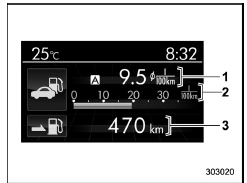
- Average fuel consumption corresponding to the driving distance of each trip meter
- Current fuel consumption
- Driving range on remaining fuel
The displayed location can be customized.
For details, refer to "Fuel consumption screen setting
 Information bar
Information bar
Outside temperature indicator
Top display
Clock
While the ignition switch is in the "ACC" or
"ON" position, the outside temperature
indicator, clock, etc. will be sho ...
 ECO gauge screen (if equipped)
Average fuel consumption corresponding
to the driving distance of each trip meter
ECO gauge
The gauge pointer shows the difference
between the current fuel consumption and
the average ...
Other materials:
Airbag connector Procedure
OCCUPANT DETECTION SYSTEM (DIAGNOSTICS) > Airbag ConnectorPROCEDURE1. OCCUPANT DETECTION SYSTEM (BETWEEN AIRBAG REAR HARNESS AND SEAT HARNESS)1. How to disconnect:Press the lock arm (A) and disconnect the connector.CAUTION:When pulling the slide lock or disconnecting connector, be sure to hold th ...
Installation
EXTERIOR BODY PANELS > Door Sash TapeINSTALLATIONCAUTION:• Do not reuse the removed door sash tape. Replace it with a new tape.• Press evenly along the sash when applying the tape using a spatula or similar object to make sure no bubbles are formed.If air bubbles are formed, reapply t ...
Replacement
CONTINUOUSLY VARIABLE TRANSMISSION(TR580) > Differential Side Retainer Oil SealREPLACEMENTCAUTION:• Immediately after the vehicle has been running or after idling for a long time, the differential gear oil will be hot. Be careful not to burn yourself.• Be careful not to spill the diff ...
