
Subaru Crosstrek Service Manual: Airbag connector Procedure
OCCUPANT DETECTION SYSTEM (DIAGNOSTICS) > Airbag Connector
PROCEDURE
1. OCCUPANT DETECTION SYSTEM (BETWEEN AIRBAG REAR HARNESS AND SEAT HARNESS)
1. How to disconnect:
Press the lock arm (A) and disconnect the connector.
CAUTION:
When pulling the slide lock or disconnecting connector, be sure to hold the connector, not the harness.
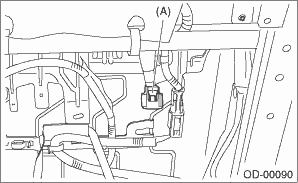
2. How to connect:
Holding the connector, push it in securely until a clicking sound is heard.
CAUTION:
Be sure to insert the connector in until it is locked. Then pull it gently to make sure that it is locked.
2. AIRBAG CONTROL MODULE
Refer to the airbag system section. Airbag Connector > PROCEDURE">
3. BUCKLE SWITCH RH
Refer to the airbag system section. Airbag Connector > PROCEDURE">
 Operation
OCCUPANT DETECTION SYSTEM (DIAGNOSTICS) > Subaru Select MonitorOPERATIONFor detailed operation procedures, refer to “Application help”. ...
 Airbag warning light illumination pattern Inspection
OCCUPANT DETECTION SYSTEM (DIAGNOSTICS) > Airbag Warning Light Illumination PatternINSPECTIONTurn the ignition switch to ON, and confirm that the airbag warning light remains on for approx. 6 secon ...
Other materials:
Inspection
GLASS/WINDOWS/MIRRORS > Relay and FuseINSPECTION1. CHECK FUSE1. Remove the fuse and check visually.2. If the fuse is blown out, replace the fuse.2. CHECK RELAY1. Check the resistance between relay terminals.Terminal No.Inspection conditionsSpecificationCircuit1 — 2Always1 M? or more1 — 2Apply ...
Note
LIGHTING SYSTEM > Turn Signal Light and Hazard Light SystemNOTEFor operation procedures of each component of the turn signal and hazard light system, refer to the respective sections.• Combination switch (light): Combination Switch (Light)">• Front turn signal light bulb: Fr ...
Dtc b1818 short in passenger s airbag dual stage - 2nd step circuit (to +b)
AIRBAG SYSTEM (DIAGNOSTICS) > Diagnostic Chart with Trouble CodeDTC B1818 SHORT IN PASSENGER’S AIRBAG DUAL STAGE - 2ND STEP CIRCUIT (TO +B)Diagnosis start condition:Ignition voltage is 10 V to 16 V.DTC detecting condition:• Airbag main harness circuit is shorted to power supply.• ...
