
Subaru Crosstrek Service Manual: Electrical specification
Blind Spot Detection/Rear Cross Traffic Alert (DIAGNOSTICS) > Control Module I/O Signal
ELECTRICAL SPECIFICATION
1. RADAR SENSOR
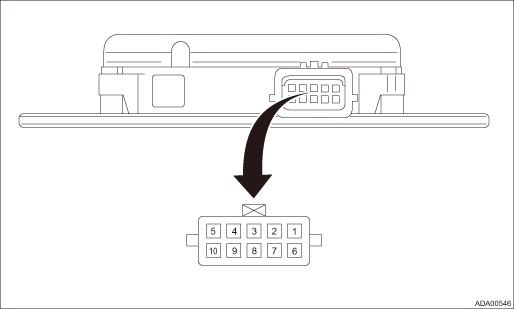
Terminal No. | Content | Measuring condition | Standard | |
Radar sensor LH (master) | Radar sensor RH (slave) | |||
1 ←> Chassis ground | Private CAN H | Private CAN H | Always | 1 M? or more |
2 ←> Chassis ground | Master CAN H | — | Always | 1 M? or more |
3 ←> Chassis ground | — | — | — | — |
4 ←> Chassis ground | Left mirror LED output | Right mirror LED output | ||
• Ignition switch OFF > ON
• BSD/RCTA OFF switch OFF > ON
• When indicator is ON: 2.5 — 10.5 V
• When indicator is blinking: 0 ←> 2.5 — 10.5 V
• When indicator is OFF: Less than 1 V
5 ←> Chassis ground
Ignition power supply
Ignition power supply
Ignition switch OFF > ON
Less than 1 V > 9 — 16 V
6 ←> Chassis ground
Private CAN L
Private CAN L
Always
1 M? or more
7 ←> Chassis ground
Master CAN L
—
Always
1 M? or more
8 ←> Chassis ground
BSD/RCTA OFF switch
—
• Ignition switch ON
• BSD/RCTA OFF switch OFF > ON (while pressing and holding the switch)
Less than 1 V > 9 — 16 V
9 ←> Chassis ground
—
—
—
—
10 ←> Chassis ground
GND
GND
Always
Less than 1 ?

 System block diagram
Blind Spot Detection/Rear Cross Traffic Alert (DIAGNOSTICS) > Control Module I/O SignalSYSTEM BLOCK DIAGRAM• Blind Spot Detection/Rear Cross Traffic Alert system consists of the following.&bu ...
Other materials:
Dtc c0047 can communication
VEHICLE DYNAMICS CONTROL (VDC) (DIAGNOSTICS) > Diagnostic Procedure with Diagnostic Trouble Code (DTC)DTC C0047 CAN COMMUNICATIONDTC DETECTING CONDITION:CAN communication line circuit is open or shorted.TROUBLE SYMPTOM:• ABS does not operate.• VDC does not operate.• EyeSight doe ...
Removal
MANUAL TRANSMISSION AND DIFFERENTIAL(5MT) > Reverse Idler GearREMOVAL1. Remove the manual transmission assembly from the vehicle. Manual Transmission Assembly > REMOVAL">2. Remove the back-up light switch and the neutral position switch. Switches and Harness > REMOVAL">3. ...
Note Note
NOTENOTEThis information will improve the efficiency of maintenance and assure the sound work.1. CLEANING• Perform the operation in a clean location and use extra caution in dust proofing.• Clean the items (except for assembly components) with steam, etc. before disassembly. During steam ...
