
Subaru Crosstrek Service Manual: Electrical component location Location
KEYLESS ACCESS WITH PUSH BUTTON START SYSTEM (DIAGNOSTICS) > Electrical Component Location
LOCATION
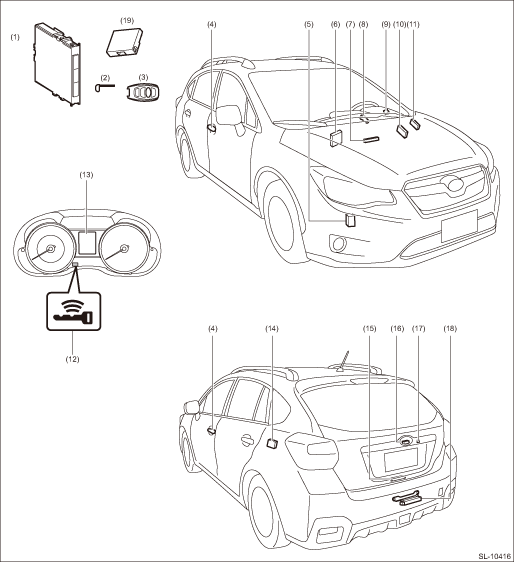
(1) | Keyless access CM | (8) | Push button ignition switch | (15) | Rear interior antenna |
(2) | Mechanical key | (9) | Steering lock CM | (16) | Rear gate opener button |
(3) | Access key | (10) | TCM | (17) | Rear lock button |
(4) | Front outer handle (front exterior antenna) |
– Touch sensor (lock)
– Touch sensor (unlock)
(11)
Body integrated unit
(18)
Rear exterior antenna
(5)
Access buzzer
(12)
Access key warning light
(19)
ID code box
(For C0 and C5 model only)
(6)
ECM
(13)
Multi information display
(7)
Front interior antenna
(14)
Receiver
 Diagnostics with phenomenon Inspection
KEYLESS ACCESS WITH PUSH BUTTON START SYSTEM (DIAGNOSTICS) > Diagnostics with PhenomenonINSPECTION1. KEYLESS ACCESS LOCK/UNLOCK CANNOT BE PERFORMED FROM ANY OF THE DOORSCAUTION:• Check that t ...
 General diagnostic table Inspection
KEYLESS ACCESS WITH PUSH BUTTON START SYSTEM (DIAGNOSTICS) > General Diagnostic TableINSPECTION1. IMMOBILIZER SYSTEMSymptomsNoteEngine does not start Diagnostics with Phenomenon > INSPECTION&quo ...
Other materials:
Removal
LIGHTING SYSTEM > Tail/Stop Light BulbREMOVAL1. CROSSTREK MODEL1. Disconnect the ground cable from battery. NOTE">2. Remove the light assembly - rear combination.CAUTION:Be careful not to damage the clips.(1) Release the bolts and clips, then pull out the light assembly - rear combinatio ...
Inspection
SECURITY AND LOCKS > ReceiverINSPECTION1. Check if the door lock operates when the touch sensor of the door outer handle and rear lock button is operated.2. If the system does not operate normally as the result of inspection, refer to “General Diagnostic Table” of the “KEYLESS A ...
Vehicle dynamics control system Wiring diagram
WIRING SYSTEM > Vehicle Dynamics Control SystemWIRING DIAGRAM1. WITHOUT EyeSight2. WITH EyeSight ...
