
Subaru Crosstrek Service Manual: Dtc b2274 acc relay control circuit
KEYLESS ACCESS WITH PUSH BUTTON START SYSTEM (DIAGNOSTICS) > Diagnostic Procedure with Diagnostic Trouble Code (DTC)
DTC B2274 ACC RELAY CONTROL CIRCUIT
DTC detecting condition:
When malfunction is detected in ACC relay drive circuit in the keyless access CM or external circuit.
Trouble symptom:
Each function does not operate at the ACC position.
CAUTION:
For replacement procedure of keyless access CM, refer to the “REGISTRATION MANUAL FOR IMMOBILIZER” provided as a separate volume.
Wiring diagram:
Push button start system Push Button Start System > WIRING DIAGRAM">
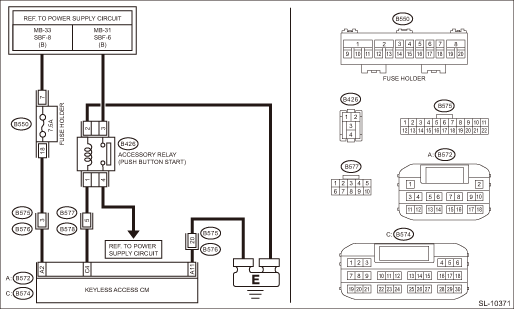
| STEP | CHECK | YES | NO |
1.CHECK LAN SYSTEM.
Inspect LAN system. Basic Diagnostic Procedure > PROCEDURE">
Is LAN system normal?
Diagnostic Procedure with Diagnostic Trouble Code (DTC) > DTC B2274 ACC RELAY CONTROL CIRCUIT">Go to Step 2.
Perform the inspection according to the diagnosis for LAN system.
2.CHECK FUSE.
Check the fuse. Relay and Fuse">
Is the fuse OK?
Diagnostic Procedure with Diagnostic Trouble Code (DTC) > DTC B2274 ACC RELAY CONTROL CIRCUIT">Go to Step 3.
Replace the fuse. When the replaced fuse is blown immediately, check the power supply circuit for short-circuited.
3.CHECK HARNESS.
1) Disconnect the keyless access CM connector.
2) Using a tester, measure the voltage between the keyless access CM connector and chassis ground.
Connector & terminal
(B572) No. 2 (+) — Chassis ground (−):
Is the voltage 9.5 — 16 V?
Diagnostic Procedure with Diagnostic Trouble Code (DTC) > DTC B2274 ACC RELAY CONTROL CIRCUIT">Go to Step 4.
Check the power supply circuit.
4.CHECK HARNESS.
Using a tester, measure the resistance between the keyless access CM connector and chassis ground.
Connector & terminal
(B572) No. 11 — Chassis ground:
Is the resistance less than 1 ??
Diagnostic Procedure with Diagnostic Trouble Code (DTC) > DTC B2274 ACC RELAY CONTROL CIRCUIT">Go to Step 5.
Repair or replace the open circuit of harness.
5.CHECK HARNESS.
1) Disconnect the keyless access CM connector.
2) Using a tester, measure the resistance between the keyless access CM connector and chassis ground.
Connector & terminal
(B574) No. 4 — Chassis ground:
Is resistance 152.61 — 216.5 ?? (20°C)
Diagnostic Procedure with Diagnostic Trouble Code (DTC) > DTC B2274 ACC RELAY CONTROL CIRCUIT">Go to Step 7.
Diagnostic Procedure with Diagnostic Trouble Code (DTC) > DTC B2274 ACC RELAY CONTROL CIRCUIT">Go to Step 6.
6.CHECK RELAY.
Perform inspection of ACC relay unit. Accessory Relay (Push Button Start)">
Is the relay OK?
Diagnostic Procedure with Diagnostic Trouble Code (DTC) > DTC B2274 ACC RELAY CONTROL CIRCUIT">Go to Step 7.
Replace the relay.
7.CHECK HARNESS.
Using a tester, measure the resistance between the keyless access CM connector and the accessory relay (push button start), and between the accessory relay (push button start) and chassis ground.
Connector & terminal
(B574) No. 4 — (B426) No. 1:
(B426) No. 2 — Chassis ground:
Is the resistance less than 1 ??
Diagnostic Procedure with Diagnostic Trouble Code (DTC) > DTC B2274 ACC RELAY CONTROL CIRCUIT">Go to Step 8.
Repair or replace the open circuit of harness.
8.CHECK KEYLESS ACCESS CM.
1) Connect the keyless access CM connector.
2) Using a tester, measure the voltage between the keyless access CM connector and chassis ground.
Connector & terminal
(B574) No. 4 (+) — Chassis ground (−):
Is the voltage 1 V or less > 9.5 — 16 V when OFF > ACC ON?
Even if DTC is displayed, the circuit has returned to a normal condition at this time. Reproduce the failure, and then perform the diagnosis again.
NOTE:
In this case, temporary poor contact of connector, temporary open or short circuit of harness may be the cause.
Replace the keyless access CM. Keyless Access CM">
 Dtc b2271 ign relay control circuit
KEYLESS ACCESS WITH PUSH BUTTON START SYSTEM (DIAGNOSTICS) > Diagnostic Procedure with Diagnostic Trouble Code (DTC)DTC B2271 IGN RELAY CONTROL CIRCUITDTC detecting condition:• When malfuncti ...
 Dtc b2275 engine start request control circuit
KEYLESS ACCESS WITH PUSH BUTTON START SYSTEM (DIAGNOSTICS) > Diagnostic Procedure with Diagnostic Trouble Code (DTC)DTC B2275 ENGINE START REQUEST CONTROL CIRCUITDTC detecting condition:• Whe ...
Other materials:
Inspection
SECURITY AND LOCKS > Keyless Access Indoor AntennaINSPECTION1. Check the setting by performing Keyless access system check using the Subaru Select Monitor. Keyless Access System Check > OPERATION">2. Disconnect the Subaru Select Monitor. Operate the touch sensor of the door outer hand ...
Control screen and audio panel
Select to display the audio source
selection screen.
Select to display the play mode
currently selected. Refer to "Select
play mode"
Select to display as a list (for the
models with AVRCP Ver. 1.4 or higher).
The track pauses when touched during
playback and plays when touched ...
Dtc b16f8 satellite safing sensor recognition error
AIRBAG SYSTEM (DIAGNOSTICS) > Diagnostic Chart with Trouble CodeDTC B16F8 SATELLITE SAFING SENSOR RECOGNITION ERRORDiagnosis start condition:Ignition voltage is 10 V to 16 V.DTC detecting condition:• Satellite safing sensor is misinstalled.• Airbag control module is faulty.STEPCHECKYE ...
