
Subaru Crosstrek Owners Manual: Control screen and audio panel
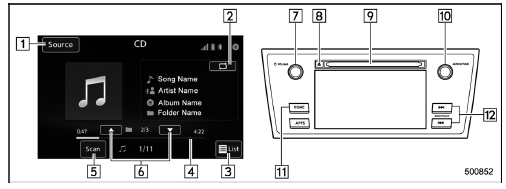
- Select to display the audio source selection screen.
- Select to display the play mode currently selected. Refer to "Select play mode"
- Audio CD:
Select to display a track list.
MP3/WMA/AAC disc: Select to display a folder list.
- Shows progress.
- The tracks in the disc are played back for 10 seconds each from the beginning of the track.
- MP3/WMA/AAC disc: Select to choose a folder.
- Turn to adjust volume.
Press to turn the audio system on/ off.
- Press to eject a disc.
- Disc slot
- Turn to select a track/file.
Press to select an audio source.
Refer to "Selecting an audio source"
- Press to display the sound setting screen. Refer to "Unit settings
- Press to select a track/file.
Press and hold to fast forward/rewind.
NOTE
- Depending on the compression data format of the inserted CD, some keys may not be displayed on the screen.
- If a disc contains CD-DA files and MP3/WMA/AAC files, only the CD-DA files can be played back.
- If a CD-TEXT disc is inserted, the title of the disc and track will be displayed. Up to 32 characters can be displayed.
- If the disc contains no CD-TEXT, only the track number would be displayed on the screen.
 CD
CD
...
 Loading a disc
CAUTION
Never try to disassemble the audio
kit or lubricate any part of the CD
player. Do not insert anything other
than a disc into the slot.
Insert a disc into the disc slot. After
insertion, ...
Other materials:
Installation
HVAC SYSTEM (HEATER, VENTILATOR AND A/C) > CompressorINSTALLATIONCAUTION:• Replace the O-rings on the hose - pressure suction and discharge with new parts, and then apply compressor oil.• After replacing the compressor assembly, adjust the amount of the compressor oil. Compressor Oil ...
List
INSTRUMENTATION/DRIVER INFO (DIAGNOSTICS) > Read Current DataLIST• Combination meter (models with normal meters)Items to be displayedUnit of measureContentNoteIG on trip numbertimesTime stamp information — IG on supply system — Time stamp information — past time after IG onmsTime stam ...
Removal
SPEED CONTROL SYSTEMS(H4DO) > Accelerator PedalREMOVAL1. Disconnect the ground cable from battery. NOTE">2. Disconnect the connector (A).3. Remove the nut (B) securing accelerator pedal assembly, and remove the accelerator pedal assembly. ...
