
Subaru Crosstrek Owners Manual: Contrast setting
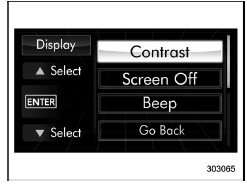
1. Perform the preparation steps according to "Preparation for image quality and volume settings"
2. Operate the "
 " or "
 "
switch to
select the "Contrast" item. Then push the
"
switch to
select the "Contrast" item. Then push the
 button.
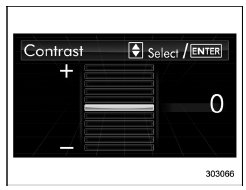
3. Select a contrast level by operating the
"
"
or " " switch, and confirm the setting
by pushing the button.
" switch, and confirm the setting
by pushing the button.
 Preparation for image quality and volume settings
1. Turn the ignition switch to the "ON"
position.
2. Push and hold the button to show
the selection screen.
3. After the selection screen is displayed,
operate the "
" or "
" sw ...
 Screen OFF setting
1. Perform the preparation steps according
to "Preparation for image quality and
volume settings"
2. Operate the "
" or "
" switch to
select the "Screen Off" item. Then push
the
...
Other materials:
Assembly
DIFFERENTIALS > Rear Differential (VA-type)ASSEMBLYNOTE:• Assemble in the reverse order of disassembly.• Check and adjust each part during assembly.• Keep the shims and washers in order, so that they are not improperly installed.• Thoroughly clean the surfaces on which the ...
Models without multi function display
NOTE
For models with information display
(black and white), refer to "Information
display"
The U.S.-spec models are not equipped
with the multi function display. The other
models may be equipped with the multi
function display or not, depending on the
model.
Safety precautions
WARNING
Alw ...
Keys
NOTE
For models with "keyless access with
push-button start system", refer to
"Keyless access with push-button start
system" 2-9.
Master key
Submaster key
Sub key
Key number plate
Three types of keys are provided for your
vehicle.
CAUTION
Do not attach a large key holder or
...
