
Subaru Crosstrek Owners Manual: Preparation for image quality and volume settings
1. Turn the ignition switch to the "ON" position.
2. Push and hold the button to show the selection screen.
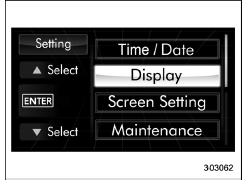
3. After the selection screen is displayed,
operate the " " or "
 " switch to show the
"Display" item. Then, push the
" switch to show the
"Display" item. Then, push the
 button.
 Image quality and volume settings
The image quality and volume settings
can be adjusted. To change the items,
operate the " " or " " switch. ...
 Contrast setting
1. Perform the preparation steps according
to "Preparation for image quality and
volume settings"
2. Operate the "
" or ""
switch to
select the "Contrast" item. Then push the
button.
...
Other materials:
Seat ventilation
The Subaru Ascent is equipped with seat ventilation for the front seats, providing
enhanced comfort during warm weather conditions.
The seat ventilation system operates when the ignition switch is in the "ON"
position.
CAUTION
Avoid placing heavy or sharp objects on the ventilate ...
Installation
EXTERIOR BODY PANELS > Door Sash TapeINSTALLATIONCAUTION:• Do not reuse the removed door sash tape. Replace it with a new tape.• Press evenly along the sash when applying the tape using a spatula or similar object to make sure no bubbles are formed.If air bubbles are formed, reapply t ...
Push-button ignition switch (models with "keyless access with push-button start
system")
Operating range for push-button start system
Antennas
Operating range
NOTE
In the Subaru Ascent, the push-button ignition system will function
only when the access key fob is detected within the effective operating range
of the built-in antennas inside the vehicle.
Even if t ...
