
Subaru Crosstrek Service Manual: Communication for initializing impossible
KEYLESS ACCESS WITH PUSH BUTTON START SYSTEM (DIAGNOSTICS) > Subaru Select Monitor
COMMUNICATION FOR INITIALIZING IMPOSSIBLE
NOTE:
Confirm that the LAN system is working properly before the diagnosis.
Subaru Select Monitor communication line is open or shorted.
Detecting condition:
• Defective harness
• Power supply circuit malfunction
• Defective keyless access CM
• Defective CAN communication circuit
• Defective Subaru Select Monitor
Trouble symptom:
Not communicable with Subaru Select Monitor.
Wiring diagram:
• Push button start system Push Button Start System > WIRING DIAGRAM">
• CAN communication system CAN Communication System > WIRING DIAGRAM">
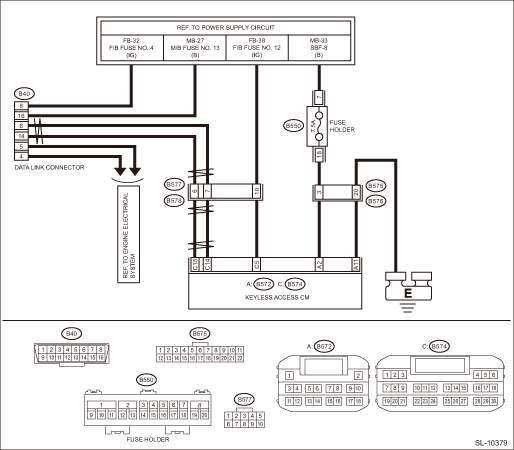
| STEP | CHECK | YES | NO |
1.CHECK OTHER COMMUNICATION.
Communicate with the system other than the keyless access system using the Subaru Select Monitor.
Is the communication to other control module possible?
Subaru Select Monitor > COMMUNICATION FOR INITIALIZING IMPOSSIBLE">Go to Step 2.
Perform the “Communication for Initializing Impossible” of LAN system. Subaru Select Monitor > COMMUNICATION FOR INITIALIZING IMPOSSIBLE">
2.CHECK DTC.
Read the DTC of the LAN system using the Subaru Select Monitor. Read Diagnostic Trouble Code (DTC)">
Is DTC detected?
Perform the diagnosis according to DTC.
Subaru Select Monitor > COMMUNICATION FOR INITIALIZING IMPOSSIBLE">Go to Step 3.
3.CHECK KEYLESS ACCESS CM.
1) Turn the ignition switch to OFF.
2) Disconnect the keyless access CM connector.
3) Connect the disconnected connectors.
4) Perform communication with the keyless access system using the Subaru Select Monitor.
Is communication possible?
It is possible that temporary poor communication occurs.
Replace the keyless access CM. Keyless Access CM">
CAUTION:
For replacement procedure of keyless access CM, refer to the “REGISTRATION MANUAL FOR IMMOBILIZER” provided as a separate volume.
 Operation
KEYLESS ACCESS WITH PUSH BUTTON START SYSTEM (DIAGNOSTICS) > Subaru Select MonitorOPERATIONFor detailed operation procedures, refer to “Application help”. ...
 Basic diagnostic procedure Procedure
KEYLESS ACCESS WITH PUSH BUTTON START SYSTEM (DIAGNOSTICS) > Basic Diagnostic ProcedurePROCEDURECAUTION:• Subaru Select Monitor kit is required for reading DTC, performing diagnosis and readi ...
Other materials:
Dtc b1015 key interlock circuit
BODY CONTROL SYSTEM (DIAGNOSTICS) > Diagnostic Procedure with Diagnostic Trouble Code (DTC)DTC B1015 KEY INTERLOCK CIRCUITDTC detecting condition:Ground short of key interlock circuitTrouble symptom:Key interlock does not keep lock condition.Wiring diagram:Shift lock control system Shift Lock Co ...
Installation
CONTINUOUSLY VARIABLE TRANSMISSION(TR580) > Primary Pulley and Secondary PulleyINSTALLATION1. Select shims for pulley alignment. Primary Pulley and Secondary Pulley > ADJUSTMENT">2. Install the seal ring to the input shaft.NOTE:• Use new seal rings.• When installing the se ...
Dtc c1542 clutch switch on malfunction
VEHICLE DYNAMICS CONTROL (VDC) (DIAGNOSTICS) > Diagnostic Procedure with Diagnostic Trouble Code (DTC)DTC C1542 CLUTCH SWITCH ON MALFUNCTIONDTC detecting condition:Abnormal clutch signalTrouble symptom:Hill start assist does not operate.NOTE:Depending on the user clutch operation patterns, the hi ...
