
Subaru Crosstrek Service Manual: Dtc b27a8 trunk/rear gate external antenna open
KEYLESS ACCESS WITH PUSH BUTTON START SYSTEM (DIAGNOSTICS) > Diagnostic Procedure with Diagnostic Trouble Code (DTC)
DTC B27A8 TRUNK/REAR GATE EXTERNAL ANTENNA OPEN
DTC detecting condition:
When open circuit occurs in the harness between keyless access CM and rear exterior antenna.
Trouble symptom:
Keyless access system does not function.
(Unable to unlock with the rear gate opener button, or unable to lock with the rear lock button.)
CAUTION:
For replacement procedure of keyless access CM, refer to the “REGISTRATION MANUAL FOR IMMOBILIZER” provided as a separate volume.
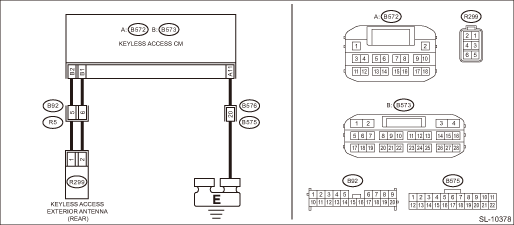
Wiring diagram:
Keyless access system Keyless Access System > WIRING DIAGRAM">
| STEP | CHECK | YES | NO |
1.CHECK LAN SYSTEM.
Inspect LAN system. Basic Diagnostic Procedure > PROCEDURE">
Is LAN system normal?
Diagnostic Procedure with Diagnostic Trouble Code (DTC) > DTC B27A8 TRUNK/REAR GATE EXTERNAL ANTENNA OPEN">Go to Step 2.
Perform the inspection according to the diagnosis for LAN system.
2.CHECK CONNECTOR.
1) Disconnect the keyless access CM connector.
2) Disconnect the rear exterior antenna connector.
Is the connector OK?
Diagnostic Procedure with Diagnostic Trouble Code (DTC) > DTC B27A8 TRUNK/REAR GATE EXTERNAL ANTENNA OPEN">Go to Step 3.
Repair or replace the connector.
3.CHECK HARNESS (OPEN CIRCUIT).
Using a tester, measure the resistance between the keyless access CM connector and rear exterior antenna connector, and between rear exterior antenna connector and chassis ground.
Connector & terminal
(B573) No. 2 — (R299) No. 1:
(B573) No. 1 — (R299) No. 2:
Is the resistance less than 1 ??
Diagnostic Procedure with Diagnostic Trouble Code (DTC) > DTC B27A8 TRUNK/REAR GATE EXTERNAL ANTENNA OPEN">Go to Step 4.
Repair or replace the open circuit of harness.
4.CHECK HARNESS (GROUND SHORT CIRCUIT).
Using a tester, measure the resistance between the keyless access CM connector and chassis ground.
Connector & terminal
(B573) No. 2 — Chassis ground:
(B573) No. 1 — Chassis ground:
Is the resistance 10 k? or more?
Diagnostic Procedure with Diagnostic Trouble Code (DTC) > DTC B27A8 TRUNK/REAR GATE EXTERNAL ANTENNA OPEN">Go to Step 5.
Repair or replace the short circuit of the harness.
5.CHECK DTC.
1) Connect the keyless access CM connector.
2) Using the Subaru Select Monitor, clear the memory. Clear Memory Mode">
3) Read DTC using the Subaru Select Monitor. Read Diagnostic Trouble Code (DTC)">
Is DTC B27A8 displayed?
Diagnostic Procedure with Diagnostic Trouble Code (DTC) > DTC B27A8 TRUNK/REAR GATE EXTERNAL ANTENNA OPEN">Go to Step 6.
Even if DTC is displayed, the circuit has returned to a normal condition at this time. Reproduce the failure, and then perform the diagnosis again.
NOTE:
In this case, temporary poor contact of connector, temporary open or short circuit of harness may be the cause.
6.CHECK KEYLESS ACCESS CM.
1) Replace the rear exterior antenna with the rear interior antenna. Keyless Access Indoor Antenna"> Keyless Access Outdoor Antenna">
2) Using the Subaru Select Monitor, clear the memory. Clear Memory Mode">
3) Read the DTC using Subaru Select Monitor. Read Diagnostic Trouble Code (DTC)">
Is DTC B27A8 displayed?
Replace the keyless access CM. Keyless Access CM">
Malfunction occurred in the rear external antenna.
 Dtc b27a7 trunk/rear gate internal antenna open
KEYLESS ACCESS WITH PUSH BUTTON START SYSTEM (DIAGNOSTICS) > Diagnostic Procedure with Diagnostic Trouble Code (DTC)DTC B27A7 TRUNK/REAR GATE INTERNAL ANTENNA OPENDTC detecting condition:When open ...
 Dtc b1572 imm circuit except antenna circuit
KEYLESS ACCESS WITH PUSH BUTTON START SYSTEM (DIAGNOSTICS) > Diagnostic Procedure with Diagnostic Trouble Code (DTC)DTC B1572 IMM CIRCUIT EXCEPT ANTENNA CIRCUIT1. EXCEPT FOR C0 AND C5 MODELSDTC det ...
Other materials:
Registering Bookmarks
You can register the music and artist now
being played in Bookmark.
1. Touch the tab.
2. Select the desired key. The following
items are appeared on the screen.
Item
Function
Track
When selected after the Bookmark
key is pressed, the current
track is bookmarked. ...
Help line
The help line (distance marker and vehicle
width line) is a guide to help you realize
the actual distance from the screen image.
1) Vehicle width line (oblique vertical line)
2) Approx. 10 feet (3 m) from the bumper
(green horizontal line)
3) Approx. 3 feet (1 m) from the bumper
(yellow hor ...
Dtc c2122 transmitter 2 no data
TIRE PRESSURE MONITORING SYSTEM (DIAGNOSTICS) > Diagnostic Procedure with Diagnostic Trouble Code (DTC)DTC C2122 TRANSMITTER 2 NO DATANOTE:Refer to DTC C2124 for diagnostic procedure. Diagnostic Procedure with Diagnostic Trouble Code (DTC) > DTC C2124 TRANSMITTER 4 NO DATA"> ...
