
Subaru Crosstrek Service Manual: Assembly
CONTROL SYSTEMS > Select Lever
ASSEMBLY
1. Clean all the parts before assembly.
2. Apply Multemp D or equivalent to the sliding portion of each part.
3. Assemble in the reverse order of disassembly.
NOTE:
Insert the solenoid unit terminals to the harness connector.
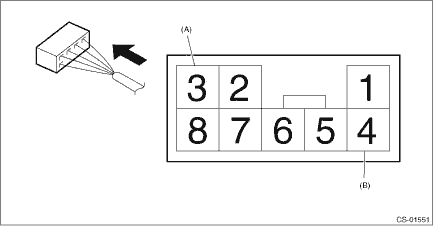
(A) | Solenoid unit (color code: blue) |
(B) | Solenoid unit (color code: black) |
4. After installation, check the following points.
• The select indicator matches the select lever position when the select lever is changed from “P” range to “D” range.
• The select lever position and the position mark match each other.
• Operating force to move the select lever from “P” to “D” range
 Select lever
...
 Removal
CONTROL SYSTEMS > Select LeverREMOVAL1. Shift the select lever to “N” range.2. Disconnect the ground cable from battery. NOTE">NOTE:For model with battery sensor, disconnect th ...
Other materials:
Dtc p0391 camshaft position sensor "b" circuit range/performance bank 2
ENGINE (DIAGNOSTICS)(H4DO) > Diagnostic Procedure with Diagnostic Trouble Code (DTC)DTC P0391 CAMSHAFT POSITION SENSOR "B" CIRCUIT RANGE/PERFORMANCE BANK 2NOTE:For the diagnostic procedure, refer to DTC P0390. Diagnostic Procedure with Diagnostic Trouble Code (DTC) > DTC P0390 CAMSH ...
Fuel octane rating
Using a gasoline with a lower octane
rating can cause persistent and heavy
knocking, which can damage the engine.
Do not be concerned if your vehicle
sometimes knocks lightly when you drive
up a hill or when you accelerate. Contact
your SUBARU dealer if you use a fuel with
the specified oct ...
Dtc c1242 rear left abs sensor signal
VEHICLE DYNAMICS CONTROL (VDC) (DIAGNOSTICS) > Diagnostic Procedure with Diagnostic Trouble Code (DTC)DTC C1242 REAR LEFT ABS SENSOR SIGNALDTC detecting condition:• Defective ABS wheel speed sensor signal (noise, irregular signal, etc.)• Defective harness connectorTrouble symptom:&bul ...
