
Subaru Crosstrek Service Manual: Assembly
BRAKE > Rear Disc Brake Assembly
ASSEMBLY
1. Before installation, check each part. Rear Disc Brake Assembly > INSPECTION">
2. Clean the inside of the caliper body cylinder using brake fluid.
3. Apply a coat of brake fluid to piston seal and install the piston seal to the caliper body cylinder groove.
4. Apply a coat of brake fluid to the inner surface of caliper body cylinder and the entire outer surface of the piston - disc brake.
5. Apply grease contained in the piston seal kit to the piston boot, and install it to the groove at the end of the cylinder.
6. Insert the piston - disc brake into the caliper body cylinder.
CAUTION:
Do not force the piston - disc brake into the caliper body cylinder.
7. Position the piston boot in the grooves on the piston - disc brake and the caliper body cylinder.
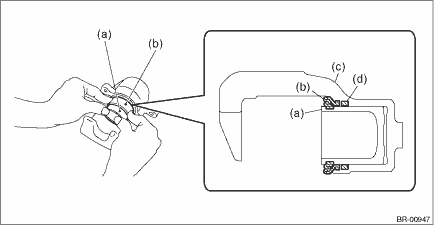
(a) | Piston - disc brake | (c) | Caliper body | (d) | Piston seal |
(b) | Piston boot |
8. Apply grease contained in the piston seal kit to the lock pin - rear brake, the outer surface of guide pin - rear brake, the inner surface of support cylinder, and the grooves of pin boot.
9. Install the pin boot to the lock pin - rear brake and guide pin - rear brake, and insert them into the support cylinder.
CAUTION:
Insert the lock pin - rear brake and guide pin - rear brake into specified position, and make sure that they slide and seat properly.
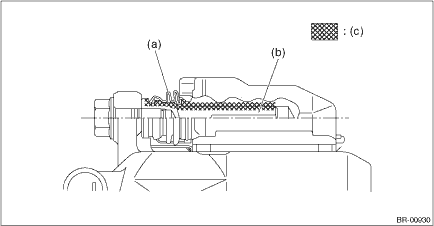
(a) | Pin boot | (b) | Lock pin - rear brake or guide pin - rear brake | (c) | Grease applied area |

 Removal
BRAKE > Rear Disc Brake AssemblyREMOVALCAUTION:Do not allow brake fluid to come in contact with the painted surface of the vehicle body. If it does, wash off with water and wipe away completely.1. ...
Other materials:
Using the cover
To extend the cover, pull the end of the
cover out of the housing, then insert its
hooks into the catches as shown. To
rewind it, unhook it from the catches and
it will rewind automatically. You should
hold on to the cover and guide it back into
the cover housing while it is rewinding.
WA ...
Specification
CONTINUOUSLY VARIABLE TRANSMISSION(TR580) > General DescriptionSPECIFICATION1. TORQUE CONVERTERModelDOHC non-turboTypeSymmetric, 3-element, single stage, 2-phase torque converterStall torque ratio2.62Nominalmm (in)236 (9.29)Stall speed (at sea level)r/min2,150 — 2,800 (D range)1,950 — 2,550 ( ...
Installation
SEAT BELT SYSTEM > Rear Seat BeltINSTALLATION1. SEAT BELT OUTER - REAR RH & LH1. Before installation, perform a unit inspection of retractor. Rear Seat Belt > INSPECTION">2. Install the seat belt outer - rear.CAUTION:• During installation, make sure that the seat belts are n ...
