
Subaru Crosstrek Service Manual: Removal
BRAKE > Rear Disc Brake Assembly
REMOVAL
CAUTION:
Do not allow brake fluid to come in contact with the painted surface of the vehicle body. If it does, wash off with water and wipe away completely.
1. Lift up the vehicle, and then remove the rear wheels.
2. Remove the caliper body assembly from the support - rear disc brake.
(1) Remove the brake hose bracket and union bolt.
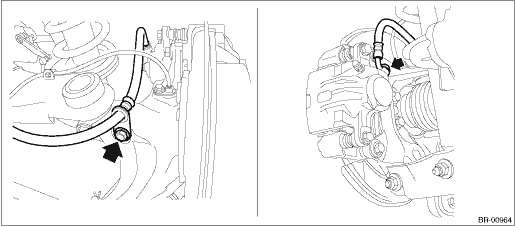
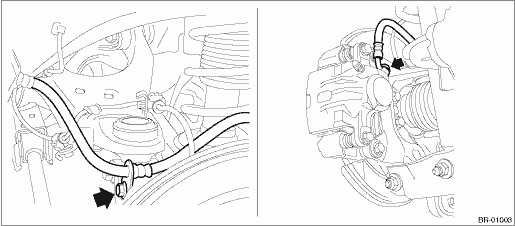
(2) Remove the caliper bolt, and remove the caliper body assembly.
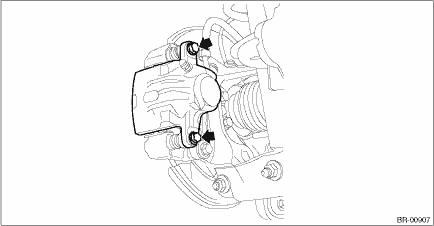
3. Remove the support - rear disc brake.
NOTE:
Remove the support - rear disc brake only when replacing the disc rotor or the support - rear disc brake. It is not necessary to remove it when servicing the caliper body assembly.
(1) Remove the brake pad from support - rear disc brake.
(2) Remove the mounting bolts, and then remove the support - rear disc brake from the housing assembly - rear axle.
 Assembly
BRAKE > Rear Disc Brake AssemblyASSEMBLY1. Before installation, check each part. Rear Disc Brake Assembly > INSPECTION">2. Clean the inside of the caliper body cylinder using brake flui ...
 Disassembly
BRAKE > Rear Disc Brake AssemblyDISASSEMBLYCAUTION:Be careful not to allow foreign matter to enter the brake hose connector.1. Remove mud and foreign matter from the caliper body assembly.2. Remove ...
Other materials:
Removal
FUEL INJECTION (FUEL SYSTEMS)(H4DO) > Fuel InjectorREMOVAL1. Release the fuel pressure. Fuel > PROCEDURE">2. Disconnect the ground cable from battery.3. Open the fuel filler lid and remove the fuel filler cap.NOTE:This operation is required to release the inner pressure of the fuel ta ...
Dtc u0151 lost communication with restraints control module
TELEMATICS SYSTEM (DIAGNOSTICS) > Diagnostic Procedure with Diagnostic Trouble Code (DTC)DTC U0151 LOST COMMUNICATION WITH RESTRAINTS CONTROL MODULEDetected when CAN data is not received from airbag CM.NOTE:Perform the diagnosis for LAN system. Basic Diagnostic Procedure > PROCEDURE"> ...
Driving tips
Do not drive with your foot resting on the
clutch pedal and do not use the clutch to
hold your vehicle at a standstill on an
upgrade. Either of those actions may
cause clutch damage.
Do not drive with your hand resting on the
shift lever. This may cause wear on the
transmission components.
...
