
Subaru Crosstrek Service Manual: Adjustment
EXTERIOR BODY PANELS > Front Door
ADJUSTMENT
Adjust the clearance around the panel assembly - front door as follows.
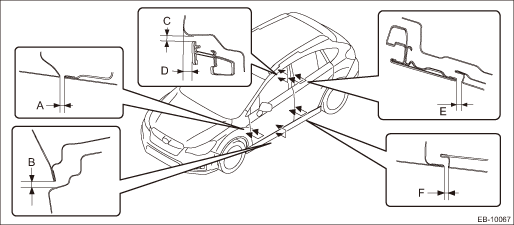
Part | Standard | |
A | Fender COMPL - front to Panel assembly - front door | 4.5±1.0 mm (0.18±0.04 in) |
B | Panel assembly - front door to Side sill | 6.0+1.5, −1.0 mm (0.24+0.06, −0.04 in) |
C | Roof panel to Front door sash | 5.1+1.5, −1.0 mm (0.20+0.06, −0.04 in) |
D | Surface level gap between roof panel and front door sash | 7±1.5 mm (0.28±0.06 in) |
E | Front door sash to Rear door sash | 5.5+1.5, −1.0 mm (0.22+0.06, −0.04 in) |
F | Panel assembly - front door to Panel assembly - rear door | 4.5±1.0 mm (0.18±0.04 in) |
1. Adjust the vertical and horizontal positions of the panel assembly - front door.
Preparation tool:
ST: WRENCH (925610000)
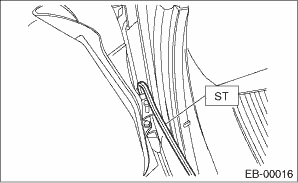
(1) Using ST, loosen the body side bolts of the upper hinge - front door and the lower hinge - front door.
(2) Adjust the vertical and horizontal clearance of the panel assembly - front door.
2. Adjust the surface level gap between the panel assembly - front door and the panel assembly - rear door.
CAUTION:
Do not use an impact wrench. Welding area on the striker nut plate is easily broken.
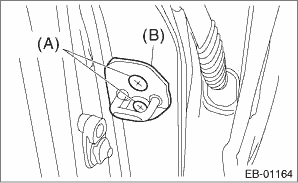
(1) Loosen the screws (A).
(2) Tap the striker - front door (B) using a plastic hammer to adjust the surface level gap between the rear end of the panel assembly - front door and the front end of the panel assembly - rear door.
 Front door
...
 Removal
EXTERIOR BODY PANELS > Front DoorREMOVAL1. FRONT DOOR PANEL1. Disconnect the ground cable from battery and wait for at least 60 seconds before starting work. NOTE">2. Remove the trim panel ...
Other materials:
Using the phone switch/microphone
Steering switch
By pressing the steering switch, a call can
be received or ended without taking your
hands off the steering wheel.
Volume control switch
Off hook switch
On hook switch
Microphone
The microphone is used when talking on
the phone.
Type A
Type B
How ...
Removal
CONTINUOUSLY VARIABLE TRANSMISSION(TR580) > Inhibitor SwitchREMOVAL1. Shift the select lever to “N” range.2. Disconnect the ground cable from battery. NOTE">NOTE:For model with battery sensor, disconnect the ground terminal from battery sensor.3. Lift up the vehicle.4. Remove ...
Installation
HVAC SYSTEM (HEATER, VENTILATOR AND A/C) > Heater DuctINSTALLATIONCAUTION:Before handling the airbag system components, refer to “CAUTION” of “General Description” in “AIRBAG SYSTEM”. General Description > CAUTION">Install each part in the reverse o ...
