
Subaru Ascent 2018-2026 Owner's Manual: X-MODE
WARNING
- When operating the Subaru Ascent with X-MODE engaged, always remain fully attentive. Overestimating the system’s capabilities can lead to hazardous situations and potentially serious accidents.
- Use extreme caution when relying on the hill descent control function
in the Subaru Ascent. This system is designed to assist, not replace driver
input.
On steep descents, icy surfaces, mud, or sand, always be prepared to apply the brake pedal manually. Failure to properly control speed may result in loss of vehicle control.
CAUTION
- Even with X-MODE, the Subaru Ascent requires proper winter tires when driving on snow or ice. The presence of this system does not eliminate the need for safe driving practices or appropriate equipment.
- Activate X-MODE in the Subaru Ascent only when driving at low speeds
on slippery or uneven terrain.
Always reduce speed before engaging X-MODE to ensure maximum effectiveness and safety.
- If any suspension, steering, or drivetrain components of the Subaru Ascent are serviced or replaced, have the X-MODE system inspected by an authorized SUBARU dealer.
- For optimal operation of X-MODE in the Subaru Ascent, observe the following
requirements:
- All four tires must match in size, type, and brand, and should have uniform wear.
- Maintain correct tire pressure according to the specifications listed on the vehicle’s door pillar.
- Only use the designated temporary spare tire. Using a standard temporary spare may reduce the effectiveness of X-MODE and affect driving performance.
- Extended use of the hill descent control function may cause the brake
components in the Subaru Ascent to heat up.
If this occurs, the system may temporarily deactivate, and the hill descent indicator will disappear until normal operating temperatures are restored.
X-MODE in the Subaru Ascent is a comprehensive control system that integrates engine output, all-wheel drive (AWD), and the Vehicle Dynamics Control system to optimize traction and stability on challenging surfaces.
By activating X-MODE, the Subaru Ascent becomes significantly more capable in low-traction environments, such as steep inclines, declines, muddy trails, or snow-covered roads, allowing for smoother and more controlled driving.
X-MODE includes the following key functions.
- Hill descent control function:
The hill descent control feature in the Subaru Ascent automatically regulates vehicle speed when driving downhill. If speed begins to increase beyond the set threshold, the braking system engages to maintain a steady and controlled descent without requiring constant pedal input.
- Driving ability control:
This function enhances traction and torque distribution in the Subaru Ascent, improving climbing performance and enabling smoother throttle response. It allows for more precise steering control, especially in difficult terrain conditions.
To activate/deactivate X-MODE
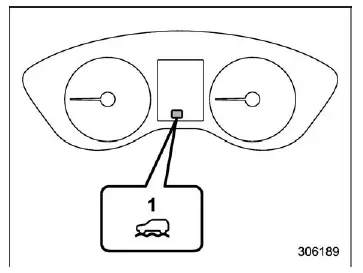
X-MODE indicator (models with 1 mode)
- X-MODE indicator
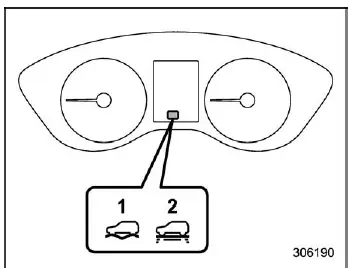
X-MODE indicator (models with 2 modes)
- DEEP SNOW/MUD mode indicator
- SNOW/DIRT mode indicator
To enable or disable X-MODE in the Subaru Ascent, use the center information display. Detailed steps can be found in the "Car settings" section.
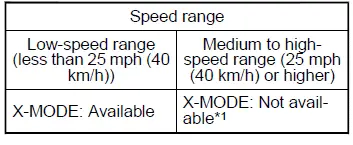
X-MODE control (models with 1 mode)
X-MODE control (models with 2 modes)
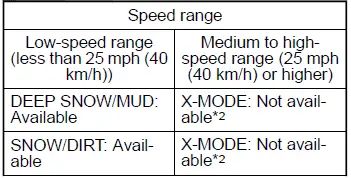
*1: If the Subaru Ascent exceeds approximately 25 mph (40 km/h) while X-MODE
is active, the system will automatically deactivate and a warning buzzer will sound
once.
*2: In models with automatic reactivation, X-MODE will disengage at speeds above
25 mph (40 km/h) and automatically reactivate when speed drops below approximately
22 mph (35 km/h).
NOTE
- X-MODE in the Subaru Ascent cannot be activated at speeds above approximately 12 mph (20 km/h). If attempted, a warning buzzer will sound.
- While the engine is running, X-MODE will automatically deactivate if
any of the following conditions occur:
- The CHECK ENGINE warning light illuminates.
- The AT OIL TEMP warning light flashes.
- The ABS warning light is on.
- The Vehicle Dynamics Control warning light is on.
- If the Subaru Ascent engine coolant temperature rises excessively, X-MODE may not activate or may shut off automatically to protect the engine.
Models with 2 modes:
- SNOW/DIRT mode is ideal for driving the Subaru Ascent on lightly snow-covered roads or gravel surfaces where tire contact is still visible.
- DEEP SNOW/MUD mode is designed for extreme conditions, such as deep snow or thick mud where tire grip is minimal.
- If cruise control is used after X-MODE has been automatically deactivated, the system will not re-engage even if vehicle speed drops below the activation threshold.
Hill descent control function
The hill descent control function in the Subaru Ascent enters standby mode when X-MODE is active and vehicle speed is below approximately 12 mph (20 km/h).
It automatically engages when speed remains below this threshold and the accelerator pedal is used minimally (less than approximately 10%).
The system disengages when the Subaru Ascent exceeds approximately 12 mph (20 km/h) or when the accelerator pedal is pressed more firmly.
CAUTION
The hill descent control function may not provide sufficient braking force under heavy load conditions, such as when towing with the Subaru Ascent.
NOTE
- Even when hill descent control is active in the Subaru Ascent, the driver can adjust speed using the brake or accelerator pedals.
- The brake lights will illuminate automatically when the system applies braking force.
- The system operates regardless of the steepness of the slope.
- During operation, certain sensations are normal:
- Brief mechanical sounds from the engine compartment
- A firmer or different brake pedal feel compared to normal driving
Hill descent control indicator
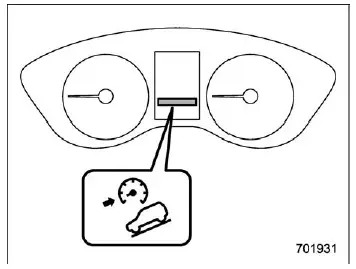
The indicator appears on the Subaru Ascent display when the hill descent control function is in standby mode. It flashes while the system is actively controlling vehicle speed and disappears when the function is disabled. After operation, the indicator will turn off once vehicle speed exceeds approximately 18 mph (30 km/h).
The Subaru Ascent X-MODE system significantly enhances off-road capability and driver confidence in challenging environments, but it should always be used responsibly with full attention to surrounding conditions.
 Vehicle Dynamics Control system
WARNING
Even when driving a Subaru Ascent equipped with the Vehicle Dynamics Control
system, always remain attentive and cautious. Relying too heavily on electronic
assistance systems can lead to ...
 Tire pressure monitoring system (TPMS) (U.S.-spec. models)
The tire pressure monitoring system (TPMS) in the Subaru Ascent is designed to
continuously monitor tire pressure and alert the driver when one or more tires are
significantly underinflated. T ...
Other materials:
Assembly
FRONT SUSPENSION > Front StrutASSEMBLY1. Before assembly, check each part. Front Strut > INSPECTION">2. Using a coil spring compressor, compress the coil spring - front.CAUTION:When installing the coil spring compressor to the coil spring, follow the operation manual accompanied with ...
Occupant detection system
The occupant detection system sensor is
installed under the seat upholstery and
monitors the physique and posture of the
front passenger. Using this information,
the occupant detection system determines
whether the front passenger's SRS frontal
airbag should be deployed or not.
If the front ...
System operation check mode Operation
KEYLESS ACCESS WITH PUSH BUTTON START SYSTEM (DIAGNOSTICS) > System Operation Check ModeOPERATION1. On «Start» display, select «Diagnosis».2. On «Vehicle selection» display, input the target vehicle information and select «Confirmed».3. On «Main Menu» display, select «Each System».4. ...
