
Subaru Ascent 2018-2026 Owner's Manual: USB power supply
CAUTION
- In the Subaru Ascent, only USB Type-A and Type-C terminals are supported. Connecting devices with incompatible connectors may result in charging failure or device malfunction.
- There is always a possibility of device malfunction or data loss when using USB connections. Any connected device in the Subaru Ascent should be used at the owner's own responsibility.
- To prevent electric shock or system damage, follow these important precautions:
- Do not connect USB hubs or extension devices.
- Never insert metallic or foreign objects into the USB ports.
- Avoid exposure of the USB terminals to water or any liquids.
- Do not pull or strain the connected cable, as this may damage both the USB port and the connected device in the Subaru Ascent.
- Leaving a device connected for extended periods while the engine is off
may discharge the vehicle battery.
Even when the Subaru Ascent engine is running, it is recommended to disconnect devices when not actively charging.
- Do not connect faulty or damaged electronic devices, as this could result in overheating, smoke, or even fire hazards.
- Always unplug USB devices before adjusting or sliding the second-row seats in the Subaru Ascent to avoid accidental damage.
- When the 3rd-row USB terminal is not in use, keep it covered. Foreign objects entering the port may cause a short circuit.
NOTE
- Each USB port in the Subaru Ascent provides a rated output of DC 5 V. For maximum output capacity, refer to the specifications below. Before connecting any device, always verify that it supports this voltage and current rating. Devices requiring higher power may charge slowly or not at all.
- Some devices may require specific or proprietary cables to charge correctly. Always use the appropriate cable for optimal performance in the Subaru Ascent.
- Devices that rely on communication with a computer (such as data transfer devices) may not charge properly when connected to the vehicle USB system.
- After charging is complete, disconnect the device promptly to avoid unnecessary power usage.
How to use the USB power supply
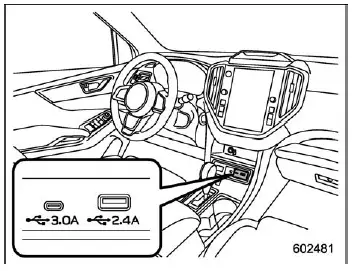
Front seat USB power supply (an audio device can be connected and used)
2-terminal type USB power supply
- USB Type-A: DC 5 V/2.4 A*
- USB Type-C: DC 5 V/3.0 A*
*: The total available current for both USB terminals is up to 5.4 A.
1-terminal type USB power supply
- USB Type-A: DC 5 V/2.4 A
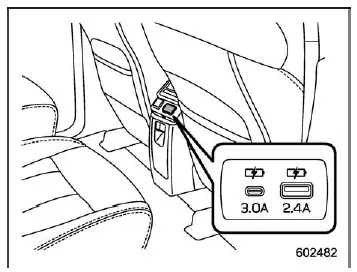
Console USB power supply (power supply function only)
- USB Type-A: DC 5 V/2.4 A*
- USB Type-C: DC 5 V/3.0 A*
*: The combined output of both ports is limited to 5.4 A in the Subaru Ascent.
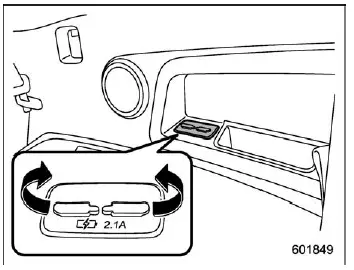
3rd-row seat USB power supply (power supply function only) (if equipped)
- USB Type-A: DC 5 V/2.1 A*
*: The maximum combined output for the 3rd-row USB ports is 4.2 A.
The Subaru Ascent USB ports allow you to power or charge compatible electronic devices conveniently while traveling.
To use the ports, open the USB cover, connect your device, and ensure a secure connection. After use, close the cover to protect the terminals.
Power is supplied when the ignition is in the "ACC" or "ON" position, ensuring consistent operation of connected devices in the Subaru Ascent.
 Power outlets
CAUTION
In the Subaru Ascent, never insert foreign objects into the accessory
power outlet, especially conductive materials such as coins or aluminum foil.
This can result in a short circuit ...
 Floor mat
CAUTION
If the floor mat in the Subaru Ascent shifts forward and interferes with pedal
operation, it may lead to loss of control and serious accidents. Follow these safety
precautions careful ...
Other materials:
Dtc b1409 scu communication
IMMOBILIZER (DIAGNOSTICS) > Diagnostic Procedure with Diagnostic Trouble Code (DTC)DTC B1409 SCU COMMUNICATIONDTC detecting condition:Communication failure between body integrated unit and security control moduleCAUTION:When the body integrated unit is replaced, registration of the immobilizer sy ...
Specification
POWER ASSISTED SYSTEM (POWER STEERING) > General DescriptionSPECIFICATIONWhole systemMinimum turning radiusm (ft)5.3 (17.4)Steering angleInner wheel38.2°±1.5°Outer wheel33.6°±1.5°Steering wheel diametermm (in)375 (14.76)Lock-to-lock revolution number2 ...
Occupant detection system
The occupant detection system sensor is
installed under the seat upholstery and
monitors the physique and posture of the
front passenger. Using this information,
the occupant detection system determines
whether the front passenger's SRS frontal
airbag should be deployed or not.
If the front ...
