
Subaru Crosstrek Owners Manual: Station list
You can select, add or delete a station.
When the  tab is touched on the main
screen, a station list will be displayed.
tab is touched on the main
screen, a station list will be displayed.
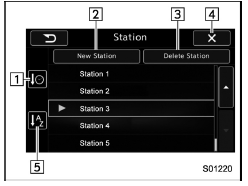
- Select to sort the list in the chronological order of when the Station List was created.
- Select to create a station.
The station can be created using track names or artist names.
- Select to delete a station.
- Return to the control screen.
- Select to sort the list based on the alphabetical order of the station names.
Store the station
You can register a station.
1. Touch the  tab on the
Pandora
main screen.
tab on the
Pandora
main screen.
2. Touch the "New Station" key, and then select the desired key.
| Item | Function |
| From Track | Select to create a station using a track name. |
| From Artist | Select to create a station using an artist name. |
| Cancel | Select to cancel the operation to add a station. |
Delete the station
You can delete a station.
1. Touch the  tab on the Pandora top
screen.
tab on the Pandora top
screen.
2. Touch the "Delete Station" key, and then the station list is appeared.
3. Select the item to delete the station. If the confirmation screen appears and the "OK" key is selected, the selected station will be deleted from station list.
 Registering Bookmarks
You can register the music and artist now
being played in Bookmark.
1. Touch the tab.
2. Select the desired key. The following
items are appeared on the screen.
Item
Function
...
 CD
CD
...
Other materials:
Installation
WHEEL AND TIRE SYSTEM > Tire Pressure Monitoring SystemINSTALLATION1. TRANSMITTER (TIRE INFLATION PRESSURE SENSOR)CAUTION:Use the new transmitter assembly or replace the new valve and screw, when installing.1. Replace the valve and screw with a new part when reusing transmitter.(1)Screw(2)Transmi ...
Dtc p0852 park/neutral switch input circuit high
ENGINE (DIAGNOSTICS)(H4DO) > Diagnostic Procedure with Diagnostic Trouble Code (DTC)DTC P0852 PARK/NEUTRAL SWITCH INPUT CIRCUIT HIGH1. AT MODELDTC detecting condition:Detected when two consecutive driving cycles with fault occur.Trouble symptom:Improper idlingCAUTION:After servicing or replacing ...
Wiring diagram
WIPER AND WASHER SYSTEMS > Wiper and Washer SystemWIRING DIAGRAM1. WIPER AND WASHER (FRONT)Refer to “Front Wiper and Washer System” in the wiring diagram. Front Wiper and Washer System > WIRING DIAGRAM">2. WIPER AND WASHER (REAR)Refer to “Rear Wiper and Washer System ...
