
Subaru Crosstrek Owners Manual: Selecting audible signal operation (models without "keyless access with push-button start system")
Using an electronic chirp, the system will give you an audible signal when the doors lock and unlock. If desired, you may turn the audible signal off.
Perform the following steps to deactivate the audible signal. You can also use the same steps to restore the function.
1. Sit in the driver's seat and shut all doors and the rear gate.
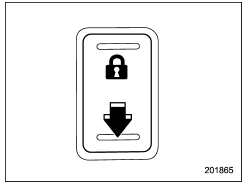
2. Hold down the REAR (UNLOCK) side of the power door locking switch.
3. While holding down the REAR (UNLOCK) side of the power door locking switch, pull the key out and re-insert it into the ignition switch at least 6 times within 10 seconds after Step 2.
4. Open and close the driver's door once within 10 seconds after Step 3.
5. The hazard warning flashers flash 3 times to indicate completion of the setting.
You may have the above settings done by your SUBARU dealer. Also, for models with a multi function display, the setting can be changed using the display. For details, refer to "Keyless buzzer volume setting" 3-78.
Replacing the battery
Refer to "Replacing key battery"
 Sounding a panic alarm
To activate the alarm, press the "PANIC"
button once.
The horn will sound and the hazard
warning flashers will flash.
To deactivate the panic alarm, press any
button on the remote transmitter ...
 Replacing lost transmitters
If you lose a transmitter or want to
purchase additional transmitters (up to
four can be programmed), your transmitters
should be reprogrammed for security
reasons. For details, contact your
SUBA ...
Other materials:
Dtc c1424 ecm
VEHICLE DYNAMICS CONTROL (VDC) (DIAGNOSTICS) > Diagnostic Procedure with Diagnostic Trouble Code (DTC)DTC C1424 ECMDTC detecting condition:ECM malfunctioningTrouble symptom:• ABS does not operate.• VDC does not operate.• Hill start assist does not operate.STEPCHECKYESNO1.CHECK E ...
Inspection
CLUTCH SYSTEM > Release Bearing and LeverINSPECTION1. RELEASE BEARINGCAUTION:Since this bearing is grease-sealed and is a non-lubrication type, do not wash with gasoline or any other solvent when servicing the clutch.1. Check the bearing for smooth movement by applying force to the bearing in the ...
Dtc p0101 mass or volume air flow sensor "a" circuit range/performance
ENGINE (DIAGNOSTICS)(H4DO) > Diagnostic Procedure with Diagnostic Trouble Code (DTC)DTC P0101 MASS OR VOLUME AIR FLOW SENSOR "A" CIRCUIT RANGE/PERFORMANCEDTC DETECTING CONDITION:Detected when two consecutive driving cycles with fault occur.TROUBLE SYMPTOM:• Improper idling• ...
