
Subaru Crosstrek Service Manual: Replacement
MANUAL TRANSMISSION AND DIFFERENTIAL(5MT) > Transmission Gear Oil
REPLACEMENT
1. Pull out the oil level gauge.
2. Lift up the vehicle.
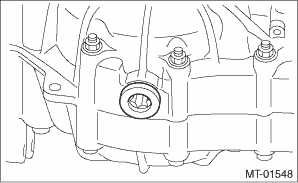
3. Using the TORX® bit T70, remove the drain plug, and drain the gear oil completely.
CAUTION:
• Immediately after the vehicle has been running or after idling for a long time, the gear oil will be hot. Be careful not to receive burns.
• Be careful not to spill the gear oil on the exhaust pipe, to prevent emission of smoke or causing a fire. If gear oil is spilled, wipe it off completely.
4. Attach the drain plug using TORX® bit T70.
NOTE:
• Install the drain plug after draining gear oil.
• Use a new gasket.
Tightening torque:
44 N·m (4.5 kgf-m, 32.5 ft-lb) (aluminum gasket, silver)
70 N·m (7.1 kgf-m, 51.6 ft-lb) (copper gasket, brown)
70 N·m (7.1 kgf-m, 51.6 ft-lb) (metal gasket, black)
5. Lower the vehicle.
6. Pour gear oil through the oil level gauge hole.
CAUTION:
If an alternative gear oil is used, you may not have expected functionality and performance.
Recommended gear oil:
SUBARU GEAR OIL EXTRA MT
Alternative:
GL-5 (75W-90)
Gear oil capacity:
3.5 L (3.7 US qt, 3.1 Imp qt)
7. Check the gear oil amount, and confirm that it is within the specification.
 Inspection
MANUAL TRANSMISSION AND DIFFERENTIAL(5MT) > Transmission Gear OilINSPECTION1. Park the vehicle on a level surface.2. Turn the ignition switch to OFF, and wait until the engine cools.3. Remove the o ...

Other materials:
Battery drainage prevention function
If a door or the rear gate is not completely
closed, the interior lights will remain
illuminated as a result. However, several
lights are automatically turned off by the
battery drainage prevention function to
prevent the battery from discharging. The
following interior lights are affected by ...
Inspection
DRIVE SHAFT SYSTEM > Front Hub Unit BearingINSPECTION1. Moving the front tire up and down by hand, check there is no looseness in bearing, and check the wheel rotates smoothly.CAUTION:If there is unsmooth sliding operation or abnormal noise in the bearing, replace the hub unit bearing.2. Inspect ...
Bluetooth settings
Touch the tab to set Bluetooth.
Item
Function
BT Devices
Connection
Select to pair/connect the Bluetooth
devices.
In-Car-Device
setting
Select to enter the Bluetooth
device name or PIN-code.
For details, refer to "Bluetoothsettings"
F5-65. ...
