
Subaru Crosstrek Service Manual: Removal
SECURITY AND LOCKS > Remote Openers
REMOVAL
1. FRONT HOOD OPENER
1. Remove the opener handle.
(1) Remove the cable.
(2) Remove the bolt, and remove the opener handle.
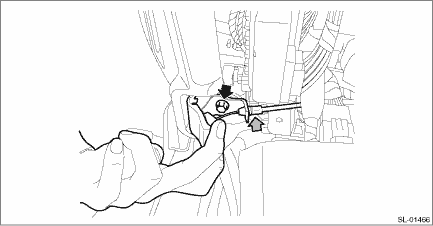
2. After removing the following parts, attach a string to the end of the cable - front hood and remove the cable clip and the cable.
• Lock assembly - front hood: Front Hood Lock Assembly > REMOVAL">
• Cover assembly - instrument panel LWR driver: Instrument Panel Lower Cover > REMOVAL">
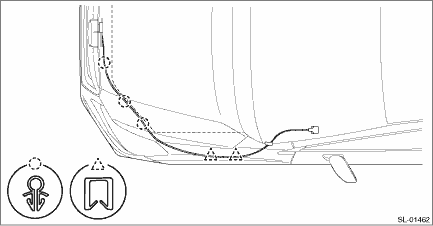
2. FUEL FLAP OPENER
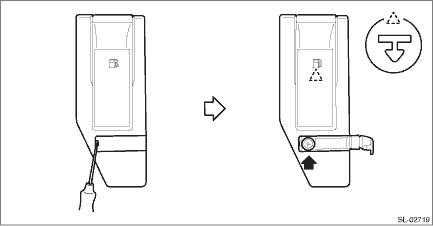
1. Remove the cover - handle.
(1) Open the cover by using a flat tip screwdriver.
(2) Remove the screws and detach the cover - handle.
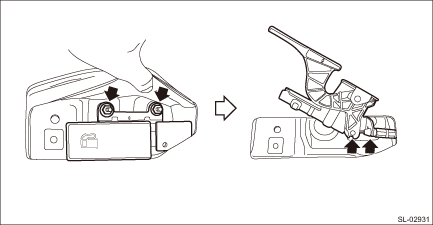
2. Remove the pull handle - opener.
(1) Remove the nut.
(2) Remove the cable from pull handle - opener.
3. Remove the trim panel - rear apron RH. Rear Quarter Trim > REMOVAL">
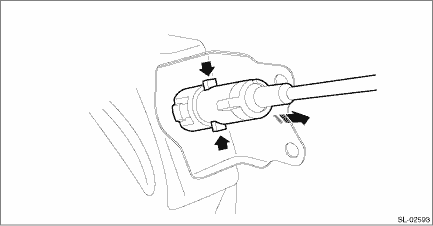
4. Remove the fuel lock inside the quarter panel.
(1) Press the claws of the fuel lock.
(2) While keeping the condition in step (1), pull the fuel lock to the rearward of the vehicle.
5. Remove the lower inner trim. Lower Inner Trim > REMOVAL">
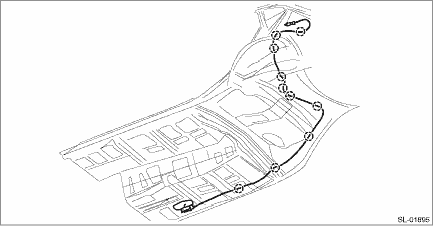
6. Remove the cable clip, and remove the cable.
 Inspection
SECURITY AND LOCKS > Remote OpenersINSPECTIONCheck if the front hood and fuel flap operate normally. ...
 Installation
SECURITY AND LOCKS > Remote OpenersINSTALLATION1. Before installation, check the following items.• Cable is free from deformation such as fray.2. Install each part in the reverse order of rem ...
Other materials:
Dtc u0140 lost communication with body control module
AUTO HEADLIGHT BEAM LEVELER SYSTEM (DIAGNOSTICS) > Diagnostic Procedure with Diagnostic Trouble Code (DTC)DTC U0140 LOST COMMUNICATION WITH BODY CONTROL MODULEDetected when CAN data (headlights ON signal) is not received from the body integrated unit.NOTE:Perform the diagnosis for LAN system. Ba ...
Starting engine
WARNING
There are some general precautions
when starting the engine.
Carefully read the precautions
described in "General precautions
when starting/stopping engine"
F7-9.
If the indicator on the pushbutton
ignition switch flashes in
green after the engine has
started, never dri ...
Preparation tool
WIPER AND WASHER SYSTEMS > General DescriptionPREPARATION TOOL1. SPECIAL TOOLILLUSTRATIONTOOL NUMBERDESCRIPTIONREMARKS — SUBARU SELECT MONITOR 4Used for setting of each function and troubleshooting for electrical system.NOTE:For detailed operation procedures of Subaru Select Monitor 4, refer to ...
