
Subaru Crosstrek Service Manual: Removal
MANUAL TRANSMISSION AND DIFFERENTIAL(5MT) > Transmission Case
REMOVAL
1. Remove the manual transmission assembly from the vehicle. Manual Transmission Assembly > REMOVAL">
2. Remove the clutch release lever and the release bearing. Release Bearing and Lever > REMOVAL">
3. Remove the transfer case together with the extension case assembly. Transfer Case and Extension Case Assembly > REMOVAL">
4. Remove the bearing mounting bolt.
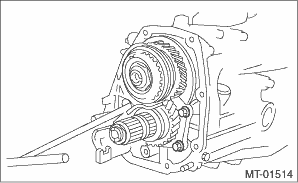
5. Remove the main shaft rear plate.
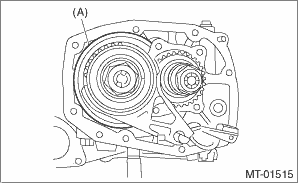
(A) | Main shaft rear plate |
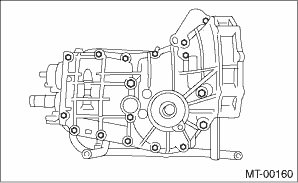
6. Remove the bolts and nuts, and separate the transmission case into the right and left cases.
7. Remove the drive pinion shaft assembly.
NOTE:
Use a hammer handle, etc. to remove if too tight.
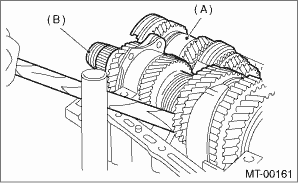
(A) | Main shaft ASSY |
(B) | Drive pinion shaft assembly |
8. Remove the main shaft assembly.
9. Remove the front differential assembly.
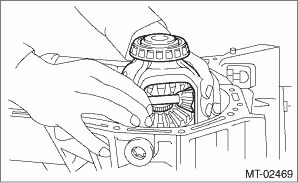
10. Remove the differential side retainers and taper roller bearing outer races on the left and right sides. Front Differential Assembly > REMOVAL">
NOTE:
Do not confuse the right and left taper roller bearing outer races.
11. Remove the reverse idler gear. Reverse Idler Gear > REMOVAL">
12. Remove the shifter fork and rod. Shifter Fork and Rod > REMOVAL">
 Inspection
MANUAL TRANSMISSION AND DIFFERENTIAL(5MT) > Transmission CaseINSPECTIONCheck the transmission case for cracks, damage, or oil leaks. ...
 Installation
MANUAL TRANSMISSION AND DIFFERENTIAL(5MT) > Transmission CaseINSTALLATION1. Wipe off grease, oil and dust on the mating surfaces of transmission cases with cleaning solvent.2. Install the reverse i ...
Other materials:
Dtc c2521 motor malfunction
POWER ASSISTED SYSTEM (POWER STEERING) (DIAGNOSTICS) > Diagnostic Procedure with Diagnostic Trouble Code (DTC)DTC C2521 MOTOR MALFUNCTIONTrouble symptom:• The steering wheel operation feels heavy.• STEERING warning light illuminates.Wiring diagram:Electric power steering system Elect ...
Basic diagnostic procedure Procedure
VEHICLE DYNAMICS CONTROL (VDC) (DIAGNOSTICS) > Basic Diagnostic ProcedurePROCEDURECAUTION:Remove foreign matter (dust, water, oil etc.) from the VDCCM&H/U connector during removal and installation.NOTE:• To check the harness for open or short circuits, shake problem spot or connector.&b ...
Inspection
SEAT BELT SYSTEM > Front Seat BeltINSPECTION1. VISUAL INSPECTIONCheck for the following, and replace with new parts if necessary.• Pretensioner is cracked or deformed.• Adjuster assembly - seat belt is cracked or deformed.• Seat belt is slackened, bent or worn.• Seat belt ...
