
Subaru Crosstrek Service Manual: Removal
CONTROL SYSTEMS > AT Shift Lock Solenoid and “P” Range Switch
REMOVAL
1. SOLENOID UNIT
1. Remove the AT select lever. Select Lever > REMOVAL">
2. Remove the spacer and gasket. Select Lever > DISASSEMBLY">
3. Using a flat tip screwdriver with a thin tip, remove the harness connector from the plate COMPL.
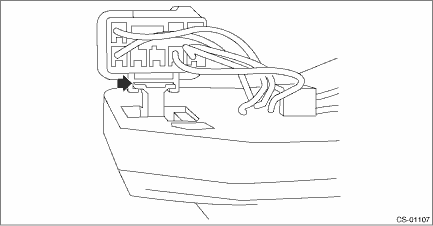
4. Raise the claw using a flat tip screwdriver with a thin tip, and remove the solenoid unit from the plate COMPL.
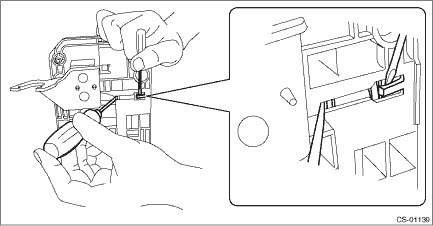
5. Remove the terminal of the solenoid unit using a flat tip precision screwdriver with a tip width of 1.3 mm (0.05 in) or less, KTC connector terminal tool ECC-1T or equivalent.
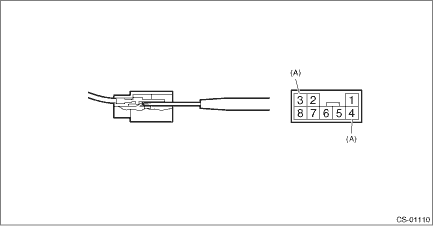
(A) | Solenoid unit terminals |
2. “P” RANGE SWITCH
For the removal of “P” range switch, refer to the procedure for AT select lever. Select Lever > DISASSEMBLY">
 Inspection
CONTROL SYSTEMS > AT Shift Lock Solenoid and “P” Range SwitchINSPECTIONSTEPCHECKYESNO1.CHECK SOLENOID UNIT.Measure the resistance of solenoid unit connector terminals.TerminalsNo. 4 — ...
 Installation
CONTROL SYSTEMS > AT Shift Lock Solenoid and “P” Range SwitchINSTALLATIONInstall in the reverse order of removal.NOTE:Insert the solenoid unit terminals to the harness connector.(A)Sole ...
Other materials:
Replacement
CONTINUOUSLY VARIABLE TRANSMISSION(TR580) > Differential Gear OilREPLACEMENTCAUTION:• Immediately after the vehicle has been running or after idling for a long time, the differential gear oil will be hot. Be careful not to burn yourself.• Be careful not to spill differential gear oil ...
Registration body integrated unit Operation
BODY CONTROL SYSTEM (DIAGNOSTICS) > Registration Body Integrated UnitOPERATION1. CONFIRM CURRENT SETTING1. On «Start» display, select «Diagnosis».2. On «Vehicle selection» display, input the target vehicle information and select «Confirmed».3. On «Main Menu» display, select «Each Syste ...
Inspection
DRIVE SHAFT SYSTEM > Rear Hub Unit BearingINSPECTION1. Moving the rear tire up and down by hand, check there is no looseness in bearing, and check the wheel rotates smoothly.CAUTION:If there is unsmooth sliding operation or abnormal noise in the bearing, replace the rear hub unit bearing.2. Inspe ...
