
Subaru Crosstrek Service Manual: Removal
COMMUNICATION SYSTEM > Horn
REMOVAL
CAUTION:
Do not remove the bumper face - front when removing the horn, in order to prevent damaging the claws of the bracket - front bumper corner and the bracket - front bumper side.
1. Disconnect the ground cable from battery. NOTE">
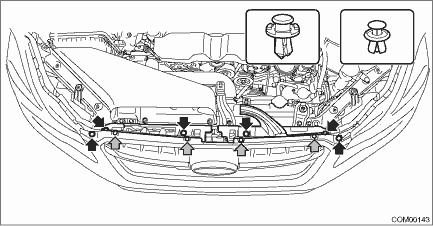
2. Remove the clip, and remove the bracket - grille.
3. Remove the horn assembly - Lo.
(1) Disconnect the connector.
(2) Remove the horn bracket mounting bolt, and remove the horn assembly - Lo.

4. Remove the horn assembly - Hi.
(1) Remove the screw and clips, and turn over the front side of the mud guard - front.

(2) Disconnect the horn connector.
(3) Remove the horn bracket mounting bolt, and remove the horn assembly - Hi.
CAUTION:
The resistor may become hot. Be careful not to burn yourself.

 Inspection
COMMUNICATION SYSTEM > HornINSPECTION1. CHECK HORN ASSEMBLY1. Remove the horn assembly (Hi & Lo). Horn > REMOVAL">2. Check the horn sounds when applying the battery voltage to the h ...
 Installation
COMMUNICATION SYSTEM > HornINSTALLATIONCAUTION:Install so that the front end of the under cover (b) comes inside the bumper face - front (a), and the front end of the mud guard (c) comes outside th ...
Other materials:
Dtc u0140 lost communication with body control module
EyeSight (DIAGNOSTICS) > Diagnostic Procedure with Diagnostic Trouble Code (DTC)DTC U0140 LOST COMMUNICATION WITH BODY CONTROL MODULEDetected when CAN data from body integrated unit is not transmitted to stereo camera.NOTE:Perform the diagnosis for LAN system. Basic Diagnostic Procedure > PRO ...
Installation
EXTERIOR/INTERIOR TRIM > Rear BumperINSTALLATIONInstall each part in the reverse order of removal.CAUTION:Before installing the bumper face, match the claws on the bracket - rear bumper with the engaging position of flange section on the bumper face side. If the engaging position is not correct, ...
Installation
FUEL INJECTION (FUEL SYSTEMS)(H4DO) > Fuel Level SensorINSTALLATIONInstall in the reverse order of removal.CAUTION:Be sure to install the fuel level sensor harness to the clip first, then install the connector cable. Otherwise, malfunction may occur.(A)Fuel level sensor harness(B)Connector cable ...
